Product Introduction: AIM7
AIM7 Overview
ArmSoM-AIM7 uses Rockchip RK3588, a new generation flagship eight-core 64-bit processor with a main frequency of up to 2.4GHz, 6 TOPS computing power NPU, and can be equipped with up to 32GB of large memory. While the interface is fully compatible with Jetson Nano, the PCIe interface has been upgraded to PCIe3.0 4-lane and PCIe2.1 1-lan.
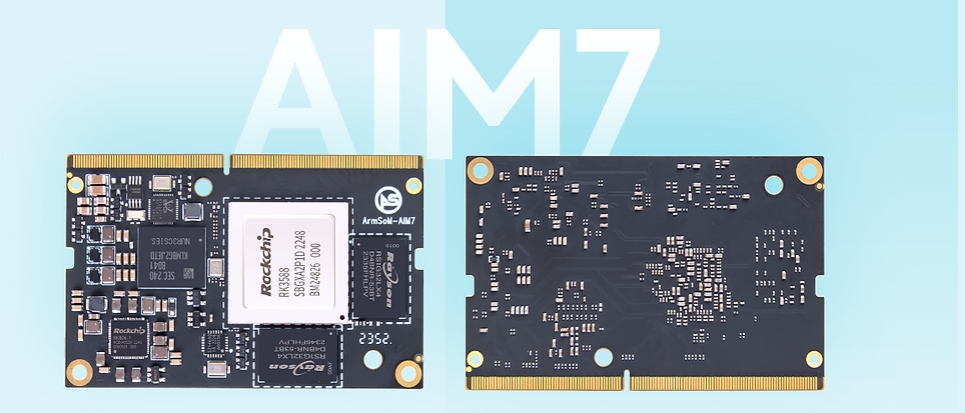
AIM7 can be applied to ARM PC, edge computing, cloud server, artificial intelligence, cloud computing, virtual/augmented reality, blockchain, smart NVR and other fields.
- ArmSoM-Sige7 AI SBC;
- ArmSoM-AIM7 AIM7 core board, ArmSoM-AIM-IO AIM Companion IO Board;
- ArmSoM-LM7 LGA core board, ArmSoM-W3 LGA core board maker kit;
With the powerful ecosystem and variety of extension modules, ArmSoM can help users easily go from ideas to prototype to mass production, making it an ideal creative platform for makers, dreamers and hobbyists.
Key Parameters
- SOC: Rockchip RK3588
- CPU: RK3588 quad-core Cortex-A76 @ 2.4GHz + quad-core Cortex-A55 @ 1.8GHz, 8nm process
- GPU: ARM Mali-G610 MP4
- NPU: Computing power up to 6 TOPS (INT8), supports INT4/INT8/INT16 mixed computing
- VPU/Codec:
- Hardware decoding: 8K@60fps H.265/VP9/AVS2, 8K@30fps H.264 AVC/MVC, 4K@60fps AV1, 1080P@60fps MPEG-2/-1/VC-1/VP8
- Hardware encoding: 8K@30fps H.265 / H.264
- RAM: 8GB/16GB/32GB (max 32GB) 64bit LPDDR4x
- Flash: 32GB/64GB/128GB eMMC
- Interface type: 260pin SO-DIMM connector, compatible with Jetson TX2 NX
- Working voltage: 5V DC
- Temperature: Operating temperature: 0°C to 80°C, Storage temperature: -20°C to 85°C
- Humidity: Relative humidity: Operation: 10% to 90%, Storage: 5% to 95%
- operating system:
- ArmSoM official images: Debian 12, Ubuntu 22.04
- Third-party support: Armbian 23.07, Ubuntu 20.04, Ubuntu22.04, Kylin OS
- PCB: 12-layer PCB board design
- weight: 17.3g
- Size: 69.6 mm x 45 mm
Getting started
AIM User Manual
How to start using your AI Module
AIM7 Hardware
Hardware Interface
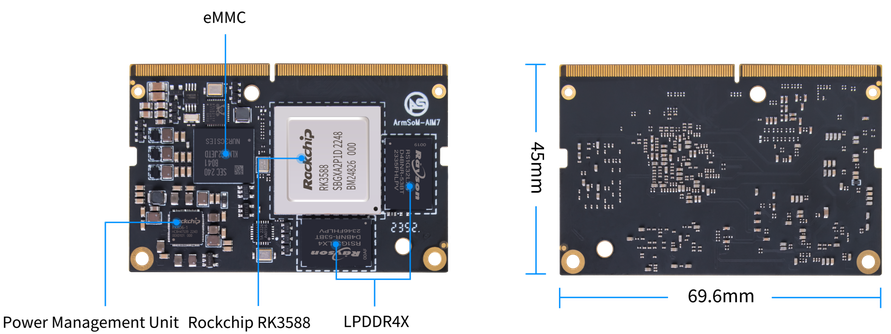
AIM7 features a 260-pin SO-DIMM form factor designed for compatibility with selected NVIDIA Jetson carrier boards. Pin functions, power requirements, and peripheral compatibility should be verified against the AIM7 pinout and validated carrier board configurations.
AIM7 Block Diagram
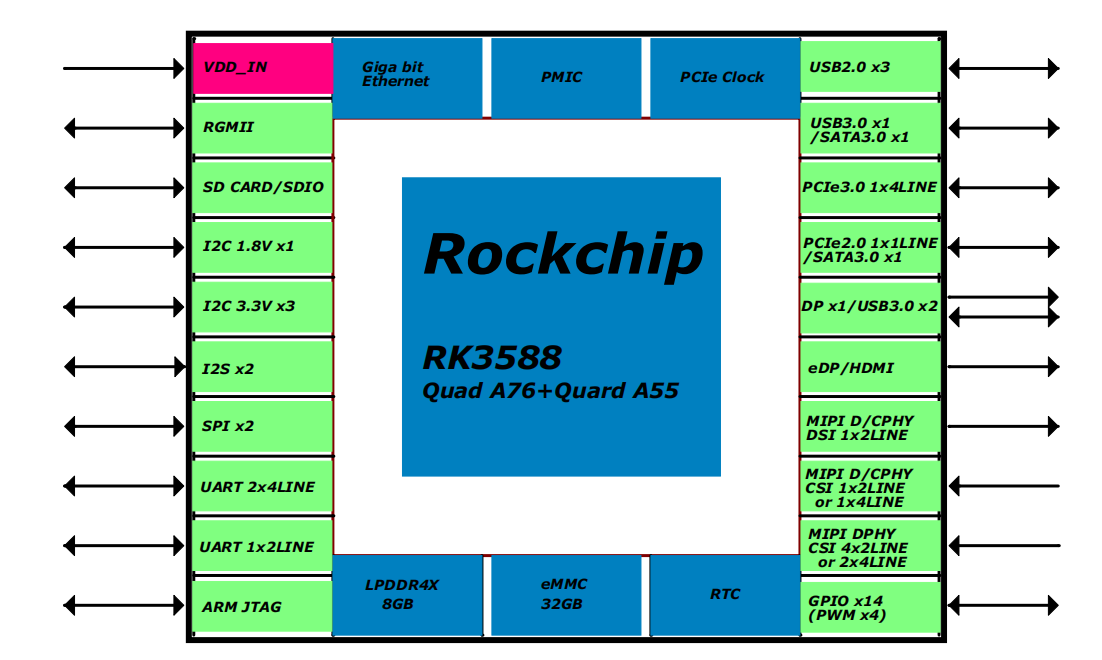
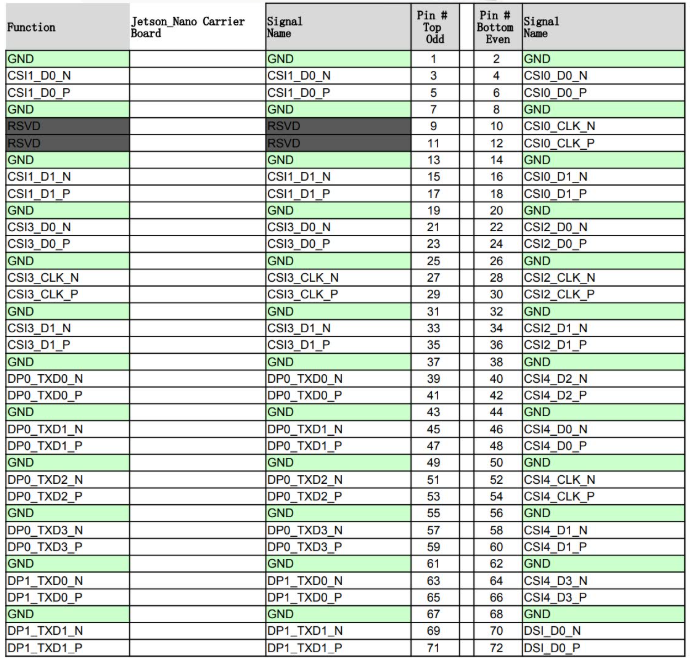
Pin Definition
Hardware Spec
AIM7 Hardware Specifications
| Category | Function |
|---|---|
| Display | |
| Camera | |
| Network | |
| PCIe | |
| USB | |
| Others |
Competitor Specifications Comparison
AIM7 Hardware Spec
| Specifications | ArmSoM-AIM7(Rockchip) | Jetson Nano (NVIDIA) |
|---|---|---|
| CPU | Quad-core ARM®Cortex®-A76 + Quad-core ARM®Cortex®-A55 | Quad-core ARM® Cortex®-A57 MPCore processor |
| GPU | ARM Mali-G610 MP4 | 128-core Maxwell GPU |
| NPU | 6TOPs(INT8) | - |
| Memory | 8GB/32GB 64-bit LPDDR4x, 2112MHz | 4GB 64-bit LPDDR4, 1600MHz |
| Storage | microSD card, 32GB eMMC 5.1 flash storage | microSD card, 16GB eMMC 5.1 flash storage |
| Video Encoding | 8K@30fps H.265 / H.264 | 250 MP/sec, 1x 4K@30 (HEVC), 2x 1080p@60 (HEVC), 4x 1080p@30 (HEVC) |
| Video Decoding | 8K@60fps H.265/VP9/AVS2, 8K@30fps H.264 AVC/MVC, 4K@60fps AV1, 1080P@60fps MPEG-2/-1/VC-1/VP8 | 500 MP/s, 1x 4K@60 (HEVC), 2x 4K@30 (HEVC), 4x 1080p@60 (HEVC), 8x 1080p@30 (HEVC) |
| USB Ports | 1 USB 3.0, 3 USB 2.0 | 1 USB 3.0, 3 USB 2.0 |
| Ethernet | 1 10/100/1000 BASE-T | 1 10/100/1000 BASE-T |
| CSI Interfaces | 12 channels (4x2) MIPI CSI-2 D-PHY1.1 (18 Gbps) | 12 channels (3x4 or 4x2) MIPI CSI-2 D-PHY 1.1 (18 Gbps) |
| I/O | 3 UARTs, 2 SPIs, 2 I2S, 4 I2Cs, multiple GPIOs | 3 UARTs, 2SPIs, 2 I2S, 4 I2Cs, multiple GPIOs |
| PCIE | 1 1/2/4lane PCIE3.0 & 1 1lane PCIE2.0 | 1 1/2/4lane PCIE2.0 |
| HDMI Output | 1 HDMI OUT2.1 / 1 eDP 1.3 | 1 HDMI 2.0 |
| DP Interface | 1 DP1.4a | 1 DP1.2 |
| eDP/DP Interface | 1 eDP 1.3 / 1 HDMI OUT2.1 | 1 eDP 1.4 / 1 DP |
| DSI Interface | 1 DSI (1 x2) 2 sync | 1 DSI (1 x2) 2 sync |
| OS Support | Support Debian,Ubuntu,Armbian | NVIDIA JetPack software suite |
| Size | 69.6 mm x 45 mm | 69.6 mm x 45 mm |
| Form Factor | 260-pin edge connector | 260-pin edge connector |
Hardware Pin Definitions
Video input interface
Two MIPI DC (DPHY/CPHY) combo PHY
- Support USE DPHY or CPHY
- Each MIPI DPHY V2.0, 4 lanes, 4.5 Gbps per lane
- Each MIPI CPHY V1.1, 3 lanes, 2.5 Gbps per lane
Four MIPI CSI DPHY
- Each MIPI DPHY V1.2, 2 lanes, 2.5 Gbps per lane
- Support combine 2 DPHY together to one 4-lan
Table 1. CSI0 pin descriptions
| Pin | Pin name | Signal description | Direction | Pin type |
|---|---|---|---|---|
| 2 | GND | Ground | ||
| 4 | CSI0_D0_N | Camera, CSI 0 Data 0– | Input | MIPI D-PHY |
| 6 | CSI0_D0_P | Camera, CSI 0 Data 0 | + Input | MIPI D-PHY |
| 8 | GND | Ground | ||
| 10 | CSI0_CLK_N | Camera, CSI 0 Clock– | Input | MIPI D-PHY |
| 12 | CSI0_CLK_P | Camera, CSI 0 Clock+ | Input | MIPI D-PHY |
| 14 | GND | Ground | ||
| 16 | CSI0_D1_N | Camera, CSI 0 Data 1– | Input | MIPI D-PHY |
| 18 | CSI0_D1_P | Camera, CSI 0 Data 1+ | Input | MIPI D-PHY |
| 114 | CAM0_PWDN | Camera, CSI 0 Data 1– | Input | MIPI D-PHY |
| 116 | CAM0_MCLK | Camera, CSI 0 Data 1+ | Input | MIPI D-PHY |
Table 2. CSI1 pin descriptions
| Pin | Pin name | Signal description | Direction | Pin type |
|---|---|---|---|---|
| 1 | GND | Ground | ||
| 3 | MIPI_CSI0_RX_D2N | Camera, CSI 1 Data 0– | Input | MIPI D-PHY |
| 5 | MIPI_CSI0_RX_D2P | Camera, CSI 1 Data 0+ | Input | MIPI D-PHY |
| 7 | GND | Ground | ||
| 9 | CSI1_CLK_N | Camera, CSI 1 Clock– | Input | MIPI D-PHY |
| 11 | CSI1_CLK_P | Camera, CSI 1 Clock+ | Input | MIPI D-PHY |
| 15 | CSI1_D1_N | Camera, CSI 1 Data 1– | Input | MIPI D-PHY |
| 17 | CSI1_D1_P | Camera, CSI 1 Data 1+ | Input | MIPI D-PHY |
| 118 | CAM1_PWDN | Camera, CSI 0 Data 1– | Input | MIPI D-PHY |
| 126 | CAM1_MCLK | Camera, CSI 0 Data 1+ | Input | MIPI D-PHY |
Table 3. CSI2 pin descriptions
| Pin | Pin name | Signal description | Direction | Pin type |
|---|---|---|---|---|
| 20 | GND | Ground | ||
| 22 | CSI2_D0_N | Camera, CSI 2 Data 0– | Input | MIPI D-PHY |
| 24 | CSI2_D0_P | Camera, CSI 2 Data 0+ | Input | MIPI D-PHY |
| 26 | GND | Ground | ||
| 28 | CSI2_CLK_N | Camera, CSI 2 Clock– | Input | MIPI D-PHY |
| 30 | CSI2_CLK_P | Camera, CSI 2 Clock+ | Input | MIPI D-PHY |
| 32 | GND | Ground | ||
| 34 | CSI2_D1_N | Camera, CSI 2 Data 1– | Input | MIPI D-PHY |
| 36 | CSI2_D1_P | Camera, CSI 2 Data 1+ | Input | MIPI D-PHY |
| 120 | CAM2_MCLK | Camera, CSI 2 Data 1– | Input | MIPI D-PHY |
| 122 | CAM2_PWDN | Camera, CSI 2 Data 1+ | Input | MIPI D-PHY |
Table 3. CSI3 pin descriptions
| Pin | Pin name | Signal description | Direction | Pin type |
|---|---|---|---|---|
| 19 | GND | Ground | ||
| 21 | CSI3_D0_N | Camera, CSI 3 Data 0– | Input | MIPI D-PHY |
| 23 | CSI3_D0_P | Camera, CSI 3 Data 0+ | Input | MIPI D-PHY |
| 25 | GND | Ground | ||
| 27 | CSI3_CLK_N | Camera, CSI 3 Clock– | Input | MIPI D-PHY |
| 29 | CSI3_CLK_P | Camera, CSI 3 Clock+ | Input | MIPI D-PHY |
| 31 | GND | Ground | ||
| 33 | CSI3_D1_N | Camera, CSI 3 Data 1– | Input | MIPI D-PHY |
| 35 | CSI3_D1_P | Camera, CSI 3 Data 1+ | Input | MIPI D-PHY |
| 216 | CAM3_MCLK | Camera, CSI 3 Data 1– | Input | MIPI D-PHY |
| 218 | CAM3_PWDN | Camera, CSI 3 Data 1+ | Input | MIPI D-PHY |
Table 4. CSI4 pin descriptions
| Pin | Pin name | Signal description | Direction | Pin type |
|---|---|---|---|---|
| 38 | GND | Ground | ||
| 40 | CSI4_D2_N | Camera, CSI 4 Data 2– | Input | MIPI D/C-PHY |
| 42 | CSI4_D2_P | Camera, CSI 4 Data 2+ | Input | MIPI D/C-PHY |
| 44 | GND | Ground | ||
| 52 | CSI4_CLK_N | Camera, CSI 4 Clock– | Input | MIPI D/C-PHY |
| 54 | CSI4_CLK_P | Camera, CSI 4 Clock+ | Input | MIPI D/C-PHY |
| 46 | CSI4_D0_N | Camera, CSI 4 Data 0– | Input | MIPI D/C-PHY |
| 48 | CSI4_D0_P | Camera, CSI 4 Data 0+ | Input | MIPI D/C-PHY |
| 58 | CSI4_D1_N | Camera, CSI 4 Data 1– | Input | MIPI D/C-PHY |
| 60 | CSI4_D1_P | Camera, CSI 4 Data 1+ | Input | MIPI D/C-PHY |
| 64 | CSI4_D3_N | Camera, CSI 4 Data 3– | Input | MIPI D/C-PHY |
| 66 | CSI4_D3_P | Camera, CSI 4 Data 3+ | Input | MIPI D/C-PHY |
| 228 | CAM4_MCLK | Camera, CSI 4 Data 1– | Input | MIPI D-PHY |
| 230 | CAM4_PWDN | Camera, CSI 4 Data 1+ | Input | MIPI D-PHY |
Video output processor
HDMI/eDP TX interface
- Support x1, x2 and x4 configuration for each interface
- Support all the data rates for HDMI FRL: 3, 6, 8, 10 and 12Gbps
- Support 1.62Gbps, 2.7Gbps and 5.4Gbps for eDP
- Support up to 7680x4320@60Hz for HDMI TX, and 4K@60Hz for eDP
- Support RGB/YUV(up to 10bit) format for HDMI TX
- Support RGB, YCbCr 4:4:4, YCbCr 4:2:2 and 8/10 bit per component video format for eDP
- Support DSC 1.2a for HDMI TX
- Support HDCP2.3 for HDMI TX, and HDCP1.3 for eDP
DP TX interface
- Support 2 DP TX 1.4a interface which combo with USB3.1 Gen1
- Support 1/2/4lanes for each interface
- Support 1.62Gbps, 2.7Gbps, 5.4Gbps and 8.1Gbps Serializer
- Support up to 7680x4320@30Hz
- Support RGB/YUV(up to 10bit) format
- Support Single Stream Transport(SST)
- Support DP Alt mode on USB Type-C
- Support HDCP2.3, HDCP 1.3
MIPI DSI interface
- Support 2 MIPI DPHY 2.0 interfaces
- Support 4 data lanes and 4.5 Gbps maximum data rate per lane
- Support max resolution 4K@60 Hz
- Support dual MIPI display: left-right mode
- Support RGB (up to 10 bits) format
- Support DSC 1.1/1.2a
Table 5. DSI pin descriptions
| Pin | Pin name | Signal description | Direction | Pin type |
|---|---|---|---|---|
| 68 | GND | Ground | ||
| 70 | DSI_D0_N | DSI Data 0– | Output | MIPI D-PHY |
| 72 | DSI_D0_P | DSI Data 0+ | Output | MIPI D-PHY |
| 74 | GND | Ground | ||
| 76 | DSI_CLK_N | DSI Clock– | Output | MIPI D-PHY |
| 78 | DSI_CLK_P | DSI Clock+ | Output | MIPI D-PHY |
| 80 | GND | Ground | ||
| 82 | DSI_D1_N | DSI Data 1– | Output | MIPI D-PHY |
| 84 | DSI_D1_P | DSI Data 1+ | Output | MIPI D-PHY |
Table 6. DP / USB3.0 pin descriptions
| Pin | Pin name | Signal description | Direction | Pin type |
|---|---|---|---|---|
| 37 | GND | Ground | ||
| 39 | DP0_TXD0_N | Display Port 0 Lane 0- | Output | DP |
| 41 | DP0_TXD0_P | Display Port 0 Lane 0+ | Output | DP |
| 43 | GND | Ground | ||
| 45 | DP0_TXD1_N | Display Port 0 Lane 1– | Output | DP |
| 47 | DP0_TXD1_P | Display Port 0 Lane 1+ | Output | DP |
| 49 | GND | Ground | ||
| 51 | DP0_TXD2_N | Display Port 0 Lane 2– | Output | DP |
| 53 | DP0_TXD2_P | Display Port 0 Lane 2+ | Output | DP |
| 55 | GND | Ground | ||
| 57 | DP0_TXD3_N | Display Port 0 Lane 3– | Output | DP |
| 59 | DP0_TXD3_P | Display Port 0 Lane 3+ | Output | DP |
| 86 | GND | Ground | ||
| 88 | DP0_HPD | Display Port 0 Hot Plug Detect | Input | Open Drain–1.8V |
| 90 | DP0_AUX_N | Display Port 0 Aux– | Bidir | DP |
| 92 | DP0_AUX_P | Display Port 0 Aux+ | Bidir | DP |
Table 7. eDP/HDMI pin descriptions
| Pin | Pin name | Signal description | Direction | Pin type |
|---|---|---|---|---|
| 61 | GND | Ground | ||
| 63 | HDMI_TXD2_N/EDP_TX0_D2N | HDMI/EDP Lane 2– | Output | HDMI/EDP |
| 65 | HDMI_TXD2_P/EDP_TX0_D2P | HDMI/EDP Lane 2+ | Output | HDMI/EDP |
| 67 | GND | Ground | ||
| 69 | HDMI_TXD1_N/EDP_TX0_D1N | HDMI/EDP Lane 1– | Output | HDMI/EDP |
| 71 | HDMI_TXD1_P/EDP_TX0_D1P | HDMI/EDP Lane 1+ | Output | HDMI/EDP |
| 73 | GND | Ground | ||
| 75 | HDMI_TXD0_N/EDP_TX0_D0N | HDMI/EDP Lane 0– | Output | HDMI/EDP |
| 77 | HDMI_TXD0_P/EDP_TX0_D0P | HDMI/EDP Lane 0+ | Output | HDMI/EDP |
| 79 | GND | Ground | ||
| 81 | HDMI_CLK_N/EDP_TX0_D3N | HDMI/EDP Clk Lane– | Output | HDMI/EDP |
| 83 | HDMI_CLK_P/EDP_TX0_D3P | HDMI/EDP Clk Lane+ | Output | HDMI/EDP |
| 98 | HDMI_SDA / EDP_TX0_AUXN | HDMI/EDP DDC SDA | Bidir | Open-Drain,3.3V |
| 100 | HDMI_SCL / EDP_TX0_AUXP | HDMI/EDP DDC SCL | Output | Open-Drain,3.3V |
| 96 | HDMI_HPD | HDMI/EDP Hot Plug Detect | Input | Open Drain–3.3V |
| 94 | HDMI_CEC | HDMI/EDP CEC | Bidir | Open Drain–1.8V |
SDIO
- Compatible with SDIO3.0 protocol
- 4-bit data bus width
Table 8. SDIO pin descriptions
| Pin | Pin name | Signal description | Direction | Pin type |
|---|---|---|---|---|
| 217 | GND | Ground | ||
| 219 | SDMMC_DAT0 | SD Card or SDIO Data 0 | Bidir | CMOS – 1.8V/3.3V |
| 221 | SDMMC_DAT1 | SD Card or SDIO Data 1 | Bidir | CMOS – 1.8V/3.3V |
| 223 | SDMMC_DAT2 | SD Card or SDIO Data 2 | Bidir | CMOS – 1.8V/3.3V |
| 225 | SDMMC_DAT3 | SD Card or SDIO Data 3 | Bidir | CMOS – 1.8V/3.3V |
| 227 | SDMMC_CMD | SD Card or SDIO Command | Bidir | CMOS – 1.8V/3.3V |
| 229 | SDMMC_CLK | SD Card or SDIO Clock | Output | CMOS – 1.8V/3.3V |
| 126 | SDMMC_DET | SD Card or SDIO DET | Output | CMOS – 1.8V/3.3V |
GMAC
Table 9. Gigabit Ethernet pin descriptions
| Pin | Pin name | Signal description | Direction | Pin type |
|---|---|---|---|---|
| 184 | GBE_MDI0_N | GbE Transformer Data 0– | Bidir | MDI |
| 186 | GBE_MDI0_P | GbE Transformer Data 0+ | Bidir | MDI |
| 188 | GBE_LED_LINK | Ethernet Link LED (Green) | Output | - |
| 190 | GBE_MDI1_N | GbE Transformer Data 1– | Bidir | MDI |
| 192 | GBE_MDI1_P | GbE Transformer Data 1+ | Bidir | MDI |
| 194 | GBE_LED_ACT | Ethernet Activity LED (Yellow) | Output | - |
| 196 | GBE_MDI2_N | GbE Transformer Data 2– | Bidir | MDI |
| 198 | GBE_MDI2_P | GbE Transformer Data 2+ | Bidir | MDI |
| 200 | GND | Ground | ||
| 202 | GBE_MDI3_N | GbE Transformer Data 3– | Bidir | MDI |
| 204 | GBE_MDI3_P | GbE Transformer Data 3+ | Bidir | MDI |
USB3.0
- Embedded two USB 3.0 OTG interfaces which combo with DP TX (USB3OTG_0 and USB3OTG_1)
- Embedded one USB 3.0 Host interface which combos with Combo PIPE PHY2 (USB3OTG_2)
Table 10. USB 3.0 GEN1 pin descriptions
| Pin | Pin name | Signal description | Direction | Pin type |
|---|---|---|---|---|
| 113 | GND | Ground | ||
| 161 | PCIE20_2_RXN/SATA30_2_RXN/USBSS_RX_N | USB SS Receive- (USB 3.0 Ctrl #0) | Input | USB SS PHY |
| 163 | PCIE20_2_RXP/SATA30_2_RXP/USBSS_RX_P | USB SS Receive+ (USB 3.0 Ctrl #0) | Input | USB SS PHY |
| 166 | PCIE20_2_TXN/SATA30_2_TXN/USBSS_TX_N | USB SS Transmit- (USB 3.0 Ctrl #0) | Output | USB SS PHY |
| 168 | PCIE20_2_TXP/SATA30_2_TXP/USBSS_TX_P | USB SS Transmit+ (USB 3.0 Ctrl #0) | Output | USB SS PHY |
USB 2.0 Host
- Compatible with USB 2.0 specification
- Support two USB 2.0 Hosts
- Supports high-speed (480 Mbps), full-speed (12 Mbps) and low-speed (1.5 Mbps) mode
- Support Enhanced Host Controller Interface Specification (EHCI), Revision 1.0
- Support Open Host Controller Interface Specification (OHCI), Revision 1.0a
Table 11. USB 2.0 pin descriptions
| Pin | Pin name | Signal description | Direction | Pin type |
|---|---|---|---|---|
| 109 | USB0_D_N | USB2.0 Port 0 Data– | Bidir | USB PHY |
| 111 | USB0_D_P | USB2.0 Port 0 Data+ | Bidir | USB PHY |
| 115 | USB1_D_N | USB 2.0 Port 1 Data– | Bidir | USB PHY |
| 117 | USB1_D_P | USB 2.0 Port 1 Data+ | Bidir | USB PHY |
| 121 | USB2_D_N | USB 2.0 Port 2 Data– | Bidir | USB PHY |
| 123 | USB2_D_P | USB 2.0 Port 2 Data+ | Bidir | USB PHY |
PCIe
PCIe 2.1 interface
- Compatible with PCI Express Base Specification Revision 2.1
- Support one lane for each PCIe 2.1 interface
- Support Root Complex (RC) only
- Support 5 Gbps data rate
Table 12. PCIe 2.1 pin descriptions
| Pin | Pinname | Signal description | Direction | Pin type |
|---|---|---|---|---|
| 171 | GND | Ground | ||
| 173 | PCIE1_CLK_N | PCIe #1 Reference Clock– (PCIe Ctrl #2) | Output | PCIe PHY |
| 175 | PCIE1_CLK_P | PCIe #1 Reference Clock+ (PCIe Ctrl #2) | Output | PCIe PHY |
| 165 | GND | Ground | ||
| 167 | PCIE1_RX_N/SATA30_0_RXN | PCIe #1 Receive 0– (PCIe Ctrl #2 Lane 0) | Input | PCIe PHY |
| 169 | PCIE1_RX_P/SATA30_0_RXP | PCIe #1 Receive 0+ (PCIe Ctrl #2 Lane 0) | Input | PCIe PHY |
| 172 | PCIE1_TX_N | PCIe #1 Transmit 0– (PCIe Ctrl #2 Lane 0) | Output | PCIe PHY |
| 174 | PCIE1_TX_P | PCIe #1 Transmit 0+ (PCIe Ctrl #2 Lane 0) | Output | PCIe PHY |
| 124 | PCIE_20X1_2_WAKE | PCIe Wake. 47kΩ pull-up to 3.3V on themodule. | Input | Open Drain – 3.3V |
| 182 | PCIE_20X1_2_CLKREQ | PCIe #1 Clock Request (PCIe Ctrl #2). 47kΩ pull-up to 3.3V on the module. | Bidir | Open Drain – 3.3V |
| 183 | PCIE_20X1_2_RST | PCIe #1 Reset (PCIe Ctrl #2). 4.7kΩ pull-up to 3.3V on the module. | Output | Open Drain – 3.3V |
PCIe 3.0 interface
- Compatible with PCI Express Base Specification Revision 3.0
- Support dual operation modes: Root Complex (RC) and End Point (EP)
- Support data rates: 2.5 Gbps (PCIe 1.1), 5 Gbps (PCIe 2.1), 8 Gbps (PCIe 3.0)
- Support aggregation and bifurcation with 1x 4 lanes, 2x 2 lanes, 4x 1 lanes and 1x 2 lanes + 2x 1 lanes
Table 13. PCIe 3.0 pin descriptions
| Pin | Pin name | Signal description | Direction | Pin type |
|---|---|---|---|---|
| 158 | GND | Ground | ||
| 160 | PCIE0_CLK_N | PCIe #0 Reference Clock– | Output | PCIe PHY |
| 162 | PCIE0_CLK_P | PCIe #0 Reference Clock+ | Output | PCIe PHY |
| 129 | GND | Ground | ||
| 131 | PCIE0_RX0_N | PCIe #0 Receive 0– (PCIe Ctrl #0 Lane 0) | Input | PCIe PHY |
| 133 | PCIE0_RX0_P | PCIe #0 Receive 0+ (PCIe Ctrl #0 Lane 0) | Input | PCIe PHY |
| 132 | GND | Ground | ||
| 134 | PCIE0_TX0_N | PCIe #0 Transmit 0– (PCIe Ctrl #0 Lane 0) | Output | PCIe PHY |
| 136 | PCIE0_TX0_P | PCIe #0 Transmit 0+ (PCIe Ctrl #0 Lane 0) | Output | PCIe PHY |
| 177 | GND | Ground | ||
| 179 | PCIE_30X4_WAKE | PCIe Wake. 47kΩ pull-up to 3.3V on themodule. | Input | Open Drain – 3.3V |
| 180 | PCIE_30X4_CLKREQ | PCIe #0 Clock Request (PCIe Ctrl #0). 47kΩpull-up to 3.3V on the module. | Bidir | Open Drain – 3.3V |
| 181 | PCIE_30X4_RST | PCIe #0 Reset (PCIe Ctrl #0). 4.7kΩ pull-up to3.3V on the module. | Bidir | Open Drain – 3.3V |
| 135 | GND | Ground | ||
| 137 | PCIE0_RX1_N | PCIe #0 Receive 1– (PCIe Ctrl #0 Lane 1) | Input | PCIe PHY |
| 139 | PCIE0_RX1_P | PCIe #0 Receive 1+ (PCIe Ctrl #0 Lane 1) | Input | PCIe PHY |
| 138 | GND | Ground | ||
| 140 | PCIE0_TX1_N | PCIe #0 Transmit 1– PCIe Ctrl #0 Lane 1) | Output | PCIe PHY |
| 142 | PCIE0_TX1_P | PCIe #0 Transmit 1+ (PCIe Ctrl #0 Lane 1) | Output | PCIe PHY |
| 125 | GND | Ground | ||
| 127 | PCIE_30X1_0_WAKE | PCIe Wake. 47kΩ pull-up to 3.3V on themodule. | Input | Open Drain – 3.3V |
| 212 | PCIE_30X1_0_CLKREQ | PCIe #0 Clock Request (PCIe Ctrl #0). 47kΩpull-up to 3.3V on the module. | Bidir | Open Drain – 3.3V |
| 195 | PCIE_30X1_0_RST | PCIe #0 Reset (PCIe Ctrl #0). 4.7kΩ pull-up to3.3V on the module. | Bidir | Open Drain – 3.3V |
| 147 | GND | Ground | ||
| 149 | PCIE0_RX2_N | PCIe #0 Receive 2– (PCIe Ctrl #0 Lane 1) | Input | PCIe PHY |
| 151 | PCIE0_RX2_P | PCIe #0 Receive 2+ (PCIe Ctrl #0 Lane 1) | Input | PCIe PHY |
| 144 | GND | Ground | ||
| 146 | GND | Ground | ||
| 148 | PCIE0_TX2_N | PCIe #0 Transmit 2– PCIe Ctrl #0 Lane 1) | Output | PCIe PHY |
| 150 | PCIE0_TX2_P | PCIe #0 Transmit 2+ (PCIe Ctrl #0 Lane 1) | Output | PCIe PHY |
| 130 | PCIE_30X2_WAKE | PCIe Wake. 47kΩ pull-up to 3.3V on themodule. | Input | Open Drain – 3.3V |
| 120 | PCIE_30X2_CLKREQ | PCIe #0 Clock Request (PCIe Ctrl #0). 47kΩpull-up to 3.3V on the module. | Bidir | Open Drain – 3.3V |
| 195128 | PCIE_30X2_RST | PCIe #0 Reset (PCIe Ctrl #0). 4.7kΩ pull-up to3.3V on the module. | Bidir | Open Drain – 3.3V |
| 153 | GND | Ground | ||
| 155 | PCIE0_RX3_N | PCIe #0 Receive 3– (PCIe Ctrl #0 Lane 1) | Input | PCIe PHY |
| 157 | PCIE0_RX3_P | PCIe #0 Receive 3+ (PCIe Ctrl #0 Lane 1) | Input | PCIe PHY |
| 152 | GND | Ground | ||
| 154 | PCIE0_TX3_N | PCIe #0 Transmit 3– PCIe Ctrl #0 Lane 1) | Output | PCIe PHY |
| 156 | PCIE0_TX3_P | PCIe #0 Transmit 3+ (PCIe Ctrl #0 Lane 1) | Output | PCIe PHY |
| 199 | PCIE_30X1_1_WAKE | PCIe Wake. 47kΩ pull-up to 3.3V on themodule. | Input | Open Drain – 3.3V |
| 211 | PCIE_30X1_1_CLKREQ | PCIe #0 Clock Request (PCIe Ctrl #0). 47kΩpull-up to 3.3V on the module. | Bidir | Open Drain – 3.3V |
| 197 | PCIE_30X1_1_RST | PCIe #0 Reset (PCIe Ctrl #0). 4.7kΩ pull-up to3.3V on the module. | Bidir | Open Drain – 3.3V |
SPI interface
- Support 5 SPI Controllers (SPI0-SPI4)
- Support two chip-select output
- Support serial-master and serial-slave mode, software-configurable
Table 14. SPI pin descriptions
| Pin | Pin name | Signal description | Direction | Pin type |
|---|---|---|---|---|
| 89 | SPI0_MOSI | SPI 0 Master Out / Slave In | Bidir | CMOS – 1.8 |
| 91 | SPI0_SCK | SPI 0 Clock | Bidir | CMOS – 1.8 |
| 93 | SPI0_MISO_M2 | SPI 0 Master In / Slave Out | Bidir | CMOS – 1.8 |
| 95 | SPI0_CS0 | SPI 0 Chip Select 0 | Bidir | CMOS – 1.8 |
| 97 | SPI0_CS1 | SPI 0 Chip Select 1 | Bidir | CMOS – 1.8 |
| 102 | GND | Ground | ||
| 104 | SPI1_MOSI | SPI 1 Master Out / Slave In | Bidir | CMOS – 1.8 |
| 106 | SPI1_SCK | SPI 1 Clock | Bidir | CMOS – 1.8 |
| 108 | SPI1_MISO | SPI 1 Master In / Slave Out | Bidir | CMOS – 1.8 |
| 110 | SPI1_CS0 | SPI 1 Chip Select 0 | Bidir | CMOS – 1.8 |
| 112 | SPI1_CS1 | SPI 1 Chip Select 1 | Bidir | CMOS – 1.8 |
I2C interface
| Pin | Pin name | Signal description | Direction | Pin type |
|---|---|---|---|---|
| 185 | I2C0_SCL | General I2C 0 Clock. 2.2kΩ pull-up to3.3V on module. | Bidir | Open Drain – 3.3V |
| 187 | I2C0_SDA | General I2C 0 Data. 2.2kΩ pull-up to 3.3V on the module. | Bidir | Open Drain – 3.3V |
| 189 | I2C1_SCL | General I2C 1 Clock. 2.2kΩ pull-up to 3.3V on the module. | Bidir | Open Drain – 3.3V |
| 191 | I2C1_SDA | General I2C 1 Data. 2.2kΩ pull-up to 3.3V on the module. | Bidir | Open Drain – 3.3V |
| 232 | I2C2_SCL | General I2C 2 Clock. 2.2kΩ pull-up to1.8V on the module. | Bidir | Open Drain – 1.8V |
| 234 | I2C2_SDA | General I2C 2 Data. 2.2kΩ pull-up to 1.8V on the module. | Bidir | Open Drain – 1.8V |
| 213 | CAM_I2C_SCL | Camera I2C Clock. 2.2kΩ pull-up to 3.3V on the module. | Bidir | Open Drain – 3.3V |
| 215 | CAM_I2C_SDA | Camera I2C Data. 2.2kΩ pull-up to 3.3V on the module. | Bidir | Open Drain – 3.3V |
UART interface
- Support 10 UART interfaces (UART0-UART9)
- Embedded two 64-byte FIFO for TX and RX operation respectively
- Support transmitting or receiving 5-bit, 6-bit, 7-bit, and 8-bit serial data
- Standard asynchronous communication bits such as start, stop and parity
- Support different input clocks for UART operation to get up to 4 Mbps baud rate
- Support auto flow control mode for all UART interfaces
Table 16. UART pin descriptions
| Pin | Pin name | Signal description | Direction | Pin type |
|---|---|---|---|---|
| 99 | UART0_TXD | UART #0 Transmit | Output | CMOS – 1.8V |
| 101 | UART0_RXD | UART #0 Receive | Input | CMOS – 1.8V |
| 103 | UART0_RTS | UART #0 Request to Send | Output | CMOS – 1.8V |
| 105 | UART0_CTS | UART #0 Clear to Send | Input | CMOS – 1.8V |
| 201 | GND | Ground | ||
| 203 | UART1_TXD | UART #1 Transmit | Output | CMOS – 1.8V |
| 205 | UART1_RXD | UART #1 Receive | Input | CMOS – 1.8V |
| 207 | UART1_RTS | UART #1 Request to Send | Output | CMOS – 1.8V |
| 209 | UART1_CTS | UART #1 Clear to Send | Input | CMOS – 1.8V |
| 236 | UART2_TXD | UART #2 Transmit | Output | CMOS – 1.8V |
| 238 | UART2_RXD | UART #2 Receive | Input | CMOS – 1.8V |
CAN bus
- Support transmitting or receiving CAN standard frame
- Support transmitting or receiving CAN extended frame
- Support transmitting or receiving data frame, remote frame, overload frame, error frame, and frame interval
Table 14. CAN pin descriptions
| Pin | Pin name | Signal description | Direction Pin type | |
|---|---|---|---|---|
| 141 | GND | Ground | ||
| 145 | CAN_TX | CAN PHY | Output | CMOS – 3.3V |
| 143 | CAN_RX | CAN PHY | Input | CMOS – 3.3V |
GPIO
- All GPIOs can be used to generate interrupt
- Support level trigger and edge trigger interrupt
- Support configurable polarity of level trigger interrupt
- Support configurable rising edge, falling edge and both edge trigger interrupt
- Support configurable pull direction (a weak pull-up and a weak pull-down)
- Support configurable drive strength
Table 15. GPIO pin descriptions
| Pin | Pin name | Signal description | Direction | Pin type |
|---|---|---|---|---|
| 87 | GPIO0/GPIO1_C5/VBUS_DET | GPIO #0 or USB 0 VBUS Enable #0 | Bidir | CMOS – 1.8V |
| 118 | GPIO01/GPIO3_A7/CAM1_PWDN | GPIO #1 or Generic Clocks | Bidir | CMOS – 1.8V |
| 124 | GPIO02/GPIO3_A3/MIPI_CAM2_PDN | GPIO #2 | Bidir | CMOS – 1.8V |
| 126 | GPIO03/GPIO3_D0/PCIE20X1_2_WAKEN_M0 | GPIO #3 | Bidir | CMOS – 1.8V |
| 127 | GPIO04/GPIO4_A4/PCIE_30X1_0_WAKE | GPIO #4 | Bidir | CMOS – 1.8V |
| 128 | GPIO05/GPIO4_B0/PCIE30X2_PERSTN_M1 | GPIO #5 | Bidir | CMOS – 1.8V |
| 130 | GPIO06/GPIO4_A7/PCIE_30X2_WAKE | GPIO #6 | Bidir | CMOS – 1.8V |
| 206 | GPIO07/GPIO3_A0/PWM10 | GPIO #7 or Pulse Width Modulator | Bidir | CMOS – 1.8V |
| 208 | GPIO08/GPIO1_C6/PWM15_IR | GPIO #8 or Fan Tach | Bidir | CMOS – 1.8V |
| 211 | I2S1_MCLK_M0/PCIE30X1_1_CLKREQN_M1 | GPIO #9 or Audio Codec Master Clock | Bidir | CMOS – 1.8V |
| 212 | GPIO10/GPIO4_A3/PCIE_30X1_0_CLKREQ | GPIO #10 | Bidir | CMOS – 1.8V |
| 216 | GPIO11/GPIO3_B0/MIPI_CAM3_CLKOUT | GPIO #11 or Generic Clocks | Bidir | CMOS – 1.8V |
| 218 | GPIO12/I2S2_MCLK_M1/MIPI_CAM3_PDN | GPIO #12 or Pulse Width Modulator | Bidir | CMOS – 1.8V |
| 228 | GPIO13/GPIO3_B1/PWM2/MIPI_CAM4_CLKOUT | GPIO #13 or Pulse Width Modulator | Bidir | CMOS – 1.8V |
| 230 | GPIO14/GPIO3_A1/PWM11_IR/MIPI_CAM4_PDN | GPIO #14 or Pulse Width Modulator | Bidir | CMOS – 1.8V |
I2C interface
| Pin | Pin name | Signal description | Direction | Pin type |
|---|---|---|---|---|
| 199 | I2S0_SCLK/PCIE_30X1_1_WAKE | I2S Audio Port 0 Clock | Bidir | CMOS – 1.8V |
| 197 | I2S0_FS/PCIE_30X1_1_RST | I2S Audio Port 0 Left/Right Clock | Bidir | CMOS – 1.8V |
| 193 | I2S0_DOUT | I2S Audio Port 0 Data Out | Output | CMOS – 1.8V |
| 195 | I2S0_DIN/PCIE_30X1_0_RST | I2S Audio Port 0 Data In | Input | CMOS – 1.8V |
| 226 | I2S1_SCLK | I2S Audio Port 1 Clock | Bidir | CMOS – 1.8V |
| 224 | I2S1_FS | I2S Audio Port 1 Left/Right Clock | Bidir | CMOS – 1.8V |
| 220 | I2S1_DOUT | I2S Audio Port 1 Data Out | Output | CMOS – 1.8V |
| 222 | I2S1_DIN | I2S Audio Port 1 Data In | Input | CMOS – 1.8V |
Pin Definitions
| ArmSoM-AIM7 function | Pin number | Pin number | ArmSoM-AIM7 function |
|---|---|---|---|
| GND_1 | 1 | 2 | GND_2 |
| CSI1_D0_N | 3 | 4 | CSI0_D0_N |
| CSI1_D0_P | 5 | 6 | CSI0_D0_P |
| GND_3 | 7 | 8 | GND_4 |
| CSI1_CLK_N | 9 | 10 | CSI0_CLK_N |
| CSI1_CLK_P | 11 | 12 | CSI0_CLK_P |
| GND_5 | 13 | 14 | GND_6 |
| CSI1_D1_N | 15 | 16 | CSI0_D1_N |
| CSI1_D1_P | 17 | 18 | CSI0_D1_P |
| GND_7 | 19 | 20 | GND_8 |
| CSI3_D0_N | 21 | 22 | CSI2_D0_N |
| CSI3_D0_P | 23 | 24 | CSI2_D0_P |
| GND_9 | 25 | 26 | GND_10 |
| CSI3_CLK_N | 27 | 28 | CSI2_CLK_N |
| CSI3_CLK_P | 29 | 30 | CSI2_CLK_P |
| GND_11 | 31 | 32 | GND_12 |
| CSI3_D1_N | 33 | 34 | CSI2_D1_N |
| CSI3_D1_P | 35 | 36 | CSI2_D1_P |
| GND_13 | 37 | 38 | GND_14 |
| TYPEC0_SSRX1N/DP0_TXD0_N | 39 | 40 | CSI4_D2_N |
| TYPEC0_SSRX1P/DP0_TXD0_P | 41 | 42 | CSI4_D2_P |
| GND_15 | 43 | 44 | GND_16 |
| TYPEC0_SSTX1N/DP0_TXD1_N | 45 | 46 | CSI4_D0_N |
| TYPEC0_SSTX1P/DP0_TXD1_P | 47 | 48 | CSI4_D0_P |
| GND_17 | 49 | 50 | GND_18 |
| TYPEC0_SSRX2N/DP0_TXD2_N | 51 | 52 | CSI4_CLK_N |
| TYPEC0_SSRX2P/DP0_TXD2_P | 53 | 54 | CSI4_CLK_P |
| GND_19 | 55 | 56 | GND_20 |
| TYPEC0_SSTX2N/DP0_TXD3_N | 57 | 58 | CSI4_D1_N |
| TYPEC0_SSTX2P/DP0_TXD3_P | 59 | 60 | CSI4_D1_P |
| GND_21 | 61 | 62 | GND_22 |
| HDMI_TXD2_N/EDP_TX0_D2N | 63 | 64 | CSI4_D3_N |
| HDMI_TXD2_P/EDP_TX0_D2P | 65 | 66 | CSI4_D3_P |
| GND_23 | 67 | 68 | GND_24 |
| HDMI_TXD1_N/EDP_TX0_D1N | 69 | 70 | DSI_D0_N |
| HDMI_TXD1_P/EDP_TX0_D1P | 71 | 72 | DSI_D0_P |
| GND_25 | 73 | 74 | GND_26 |
| HDMI_TXD0_N/EDP_TX0_D0N | 75 | 76 | DSI_CLK_N |
| HDMI_TXD0_P/EDP_TX0_D0P | 77 | 78 | DSI_CLK_P |
| GND_27 | 79 | 80 | GND_28 |
| HDMI_CLK_N/EDP_TX0_D3N | 81 | 82 | DSI_D1_N |
| HDMI_CLK_P/EDP_TX0_D3P | 83 | 84 | DSI_D1_P |
| GND_29 | 85 | 86 | GND_30 |
| GPIO0/GPIO1_C5/VBUS_DET | 87 | 88 | DP0_HPD |
| SPI0_MOSI | 89 | 90 | DP0_AUX_N |
| SPI0_SCK | 91 | 92 | DP0_AUX_P |
| SPI0_MISO_M2 | 93 | 94 | HDMI_CEC |
| SPI0_CS0 | 95 | 96 | HDMI_HPD |
| SPI0_CS1 | 97 | 98 | HDMI_SDA / EDP_TX0_AUXN |
| UART0_TXD | 99 | 100 | HDMI_SCL / EDP_TX0_AUXP |
| UART0_RXD | 101 | 102 | GND_31 |
| UART0_RTS | 103 | 104 | SPI1_MOSI |
| UART0_CTS | 105 | 106 | SPI1_SCK |
| GND_32 | 107 | 108 | SPI1_MISO |
| USB0_D_N | 109 | 110 | SPI1_CS0 |
| USB0_D_P | 111 | 112 | SPI1_CS1 |
| GND_33 | 113 | 114 | CAM0_PWDN |
| USB1_D_N | 115 | 116 | CAM0_MCLK |
| USB1_D_P | 117 | 118 | GPIO01/GPIO3_A7/CAM1_PWDN |
| GND_34 | 119 | 120 | CAM2_MCLK/PCIE30X2_CLKREQN_M1 |
| USB2_D_N | 121 | 122 | CAM2_PWDN |
| USB2_D_P | 123 | 124 | GPIO02/GPIO3_A3/MIPI_CAM2_PDN |
| GND_35 | 125 | 126 | GPIO03/GPIO3_D0/PCIE20X1_2_WAKEN_M0 |
| GPIO04/GPIO4_A4/PCIE_30X1_0_WAKE | 127 | 128 | GPIO05/GPIO4_B0/PCIE30X2_PERSTN_M1 |
| GND_36 | 129 | 130 | GPIO06/GPIO4_A7/PCIE_30X2_WAKE |
| PCIE0_RX0_N | 131 | 132 | GND_37 |
| PCIE0_RX0_P | 133 | 134 | PCIE0_TX0_N |
| GND_38 | 135 | 136 | PCIE0_TX0_P |
| PCIE0_RX1_N | 137 | 138 | GND_39 |
| PCIE0_RX1_P | 139 | 140 | PCIE0_TX1_N |
| GND_40 | 141 | 142 | PCIE0_TX1_P |
| CAN_RX | 143 | 144 | GND_41 |
| CAN_TX | 145 | 146 | GND_42 |
| GND_43 | 147 | 148 | PCIE0_TX2_N |
| PCIE0_RX2_N | 149 | 150 | PCIE0_TX2_P |
| PCIE0_RX2_P | 151 | 152 | GND_44 |
| GND_45 | 153 | 154 | PCIE0_TX3_N |
| PCIE0_RX3_N | 155 | 156 | PCIE0_TX3_P |
| PCIE0_RX3_P | 157 | 158 | GND_46 |
| GND_47 | 159 | 160 | PCIE0_CLK_N |
| PCIE20_2_RXN/SATA30_2_RXN/USBSS_RX_N | 161 | 162 | PCIE30_CLK_P |
| PCIE20_2_RXP/SATA30_2_RXP/USBSS_RX_P | 163 | 164 | GND_48 |
| GND_49 | 165 | 166 | PCIE20_2_TXN/SATA30_2_TXN/USBSS_TX_N |
| PCIE1_RX_N/SATA30_0_RXN | 167 | 168 | PCIE20_2_TXP/SATA30_2_TXP/USBSS_TX_P |
| PCIE1_RX_P/SATA30_0_RXP | 169 | 170 | GND_50 |
| GND_51 | 171 | 172 | PCIE1_TX_N/SATA30_0_TXN |
| PCIE1_CLK_N | 173 | 174 | PCIE1_TX_P/SATA30_0_TXP |
| PCIE1_CLK_P | 175 | 176 | GND_52 |
| GND_53 | 177 | 178 | MOD_SLEEP |
| PCIE_30X4_WAKE | 179 | 180 | PCIE_30X4_CLKREQ |
| PCIE_30X4_RST | 181 | 182 | PCIE_20X1_2_CLKREQ |
| PCIE_20X1_2_RST | 183 | 184 | GBE_MDI0_N |
| I2C0_SCL | 185 | 186 | GBE_MDI0_P |
| I2C0_SDA | 187 | 188 | GBE_LED_LINK |
| I2C1_SCL | 189 | 190 | GBE_MDI1_N |
| I2C1_SDA | 191 | 192 | GBE_MDI1_P |
| I2S0_DOUT | 193 | 194 | GBE_LED_ACT |
| I2S1_SDI0_M0/PCIE_30X1_0_RST | 195 | 196 | GBE_MDI2_N |
| I2S1_LRCK_M0/PCIE_30X1_1_RST | 197 | 198 | GBE_MDI2_P |
| I2S0_SCLK/PCIE_30X1_1_WAKE | 199 | 200 | GND_54 |
| GND_55 | 201 | 202 | GBE_MDI3_N |
| UART1_TXD | 203 | 204 | GBE_MDI3_P |
| UART1_RXD | 205 | 206 | GPIO07/GPIO3_A0/PWM10 |
| UART1_RTS | 207 | 208 | GPIO08/GPIO1_C6/PWM15_IR |
| UART1_CTS | 209 | 210 | 32KOUT |
| I2S1_MCLK_M0/PCIE30X1_1_CLKREQN_M1 | 211 | 212 | GPIO10/GPIO4_A3/PCIE_30X1_0_CLKREQ |
| CAM_I2C_SCL | 213 | 214 | RECOVERY_KEY |
| CAM_I2C_SDA | 215 | 216 | GPIO11/GPIO3_B0/MIPI_CAM3_CLKOUT |
| GND_56 | 217 | 218 | GPIO12/I2S2_MCLK_M1/MIPI_CAM3_PDN |
| SDMMC_DAT0 | 219 | 220 | I2S1_DOUT |
| SDMMC_DAT1 | 221 | 222 | I2S1_DIN |
| SDMMC_DAT2 | 223 | 224 | I2S1_FS |
| SDMMC_DAT3 | 225 | 226 | I2S1_SCLK |
| SDMMC_CMD | 227 | 228 | GPIO08 |
| SDMMC_CLK | 229 | 230 | GPIO14 |
| GND_57 | 231 | 232 | I2C2_SCL |
| SHUTDOWN_REQ | 233 | 234 | I2C2_SDA |
| PMIC_BBAT | 235 | 236 | UART2_TXD |
| POWER_EN | 237 | 238 | UART2_RXD |
| SYS_RESET | 239 | 240 | SLEEP/WAKE |
| GND | 241 | 242 | GND |
| GND | 243 | 244 | GND |
| GND | 245 | 246 | GND |
| GND | 247 | 248 | GND |
| GND | 249 | 250 | GNDs |
| VDD_IN | 251 | 252 | VDD_IN |
| VDD_IN | 253 | 254 | VDD_IN |
| VDD_IN | 255 | 256 | VDD_IN |
| VDD_IN | 257 | 258 | VDD_IN |
| VDD_IN | 259 | 260 | VDD_IN |
Product Introduction: AIM-IO
AIM-IO is an IO board from the ArmSoM AIM series, with dimensions of 100x80x29 mm, and is also compatible with current Jetson Nano core modules. It is a mini AI computer designed for makers, learners, and developers, capable of quickly implementing AI technology in various smart devices.
AIM-IO Hardware
Hardware Interface
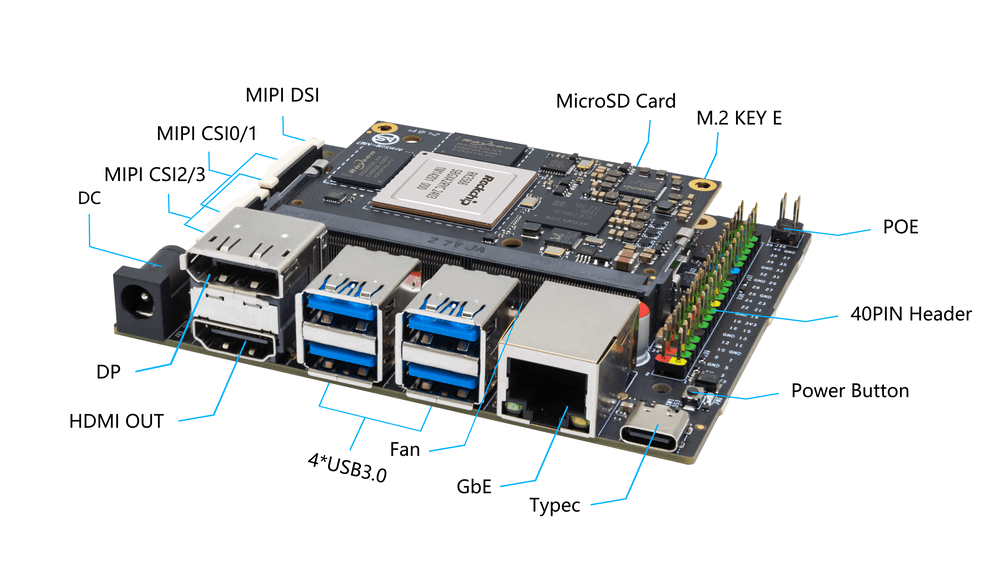
The AIM-IO Board is powered by 12V DC.
Hardware Spec
The AIM-IO Board is a companion board for AIM modules designed to assist developers using AIM modules in completing system and embedded board development. Compared to the Jetson Nano Developer Kit (B01), the AIM-IO Board is of the same size but adds 2 MIPI CSI interfaces, 1 M.2 Key-E interface, and 1 MIPI DSI interface.
- 1x DisplayPort
- 1x HDMI-out
- 4x USB 3.0 Type-A
- Gigabit Ethernet
- GPIO: 40-PIN expansion header
- POE: 5 V Power Over Ethernet
- Power Connector: DC Barrel jack for 12V power input
- Expansion: M.2 (E-key, PCIe/USB/SDIO/UART), microSD
- MIPI DSI: 1x 4 lanes MIPI DSI up to 4K@60fps (x4)
- MIPI CSI0/1: 2x 2 lanes MIPI CSI,Maximum 2.5Gbps per lane.
- MIPI CSI2/3: 1x 4 lanes MIPI CSI,Maximum 2.5Gbps per lane.
- Firmware flashing and device mode via USB Type-C
- Dimensions: 100 x 80 x 29 mm (3.94 x 3.15 x 1.14 in)
- Weight: 78.4g
Pin Definition
AIM7 40-PIN Connector
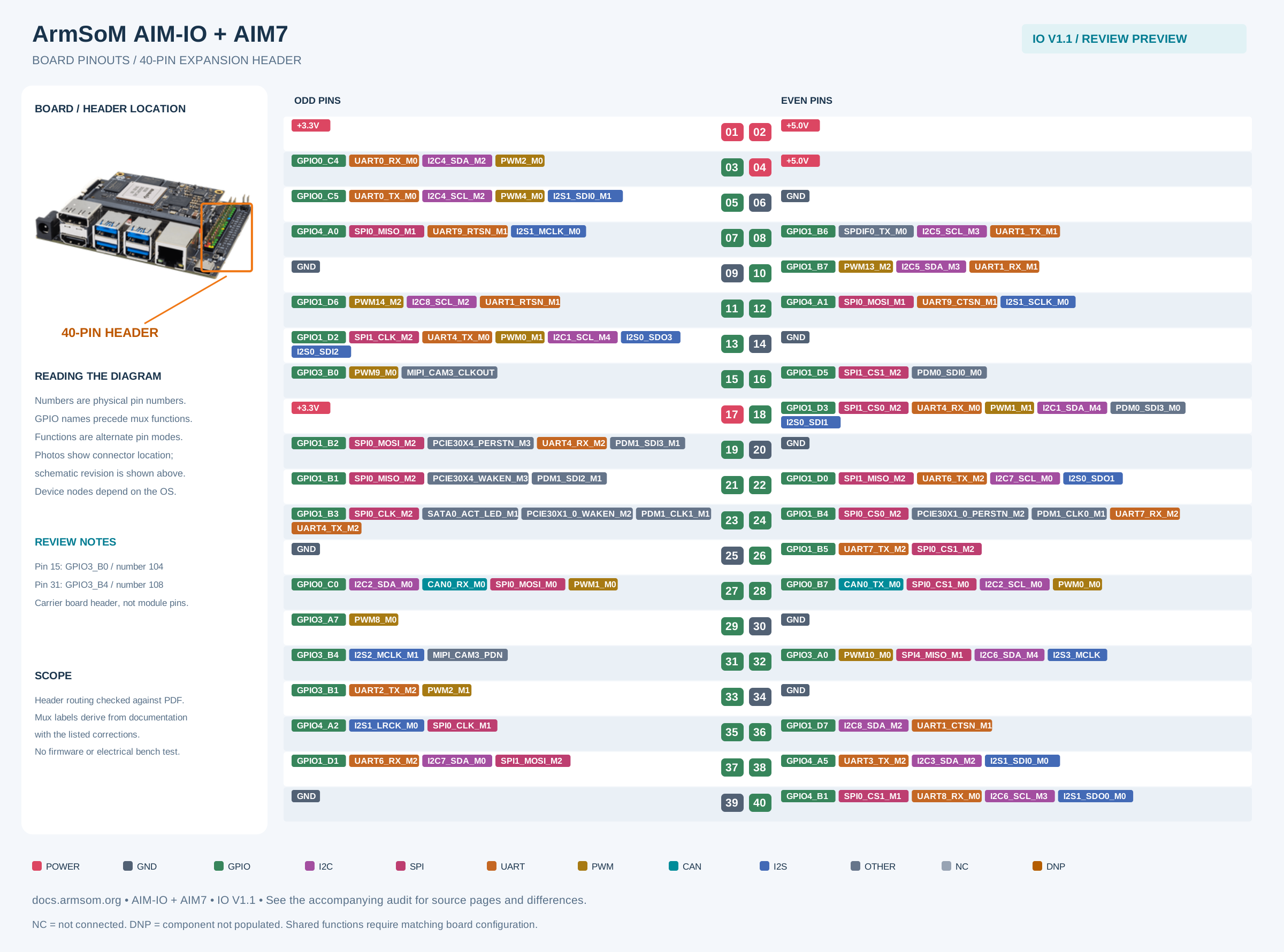
Checked against the AIM-IO V1.1 schematic. Numbers in the diagram are physical pins. NC means not connected; DNP means not populated. Alternate functions require matching system configuration; legacy GPIO numbers are not Linux gpiochip line offsets. Pin 15 is GPIO3_B0; pin 31 is GPIO3_B4.
| GPIO number (legacy) | Function | Physical pin | Physical pin | Function | GPIO number (legacy) |
|---|---|---|---|---|---|
| — | +3.3V | 1 | 2 | +5.0V | — |
| 20 | UART0_RX_M0 / I2C4_SDA_M2 / PWM2_M0 / GPIO0_C4 | 3 | 4 | +5.0V | — |
| 21 | UART0_TX_M0 / I2C4_SCL_M2 / PWM4_M0 / I2S1_SDI0_M1 / GPIO0_C5 | 5 | 6 | GND | — |
| 128 | SPI0_MISO_M1 / UART9_RTSN_M1 / I2S1_MCLK_M0 / GPIO4_A0 | 7 | 8 | SPDIF0_TX_M0 / I2C5_SCL_M3 / UART1_TX_M1 / GPIO1_B6 | 46 |
| — | GND | 9 | 10 | PWM13_M2 / I2C5_SDA_M3 / UART1_RX_M1 / GPIO1_B7 | 47 |
| 62 | PWM14_M2 / I2C8_SCL_M2 / UART1_RTSN_M1 / GPIO1_D6 | 11 | 12 | SPI0_MOSI_M1 / UART9_CTSN_M1 / I2S1_SCLK_M0 / GPIO4_A1 | 129 |
| 58 | SPI1_CLK_M2 / UART4_TX_M0 / PWM0_M1 / I2C1_SCL_M4 / I2S0_SDO3 / I2S0_SDI2 / GPIO1_D2 | 13 | 14 | GND | — |
| 104 | GPIO3_B0 / PWM9_M0 / MIPI_CAM3_CLKOUT | 15 | 16 | GPIO1_D5 / SPI1_CS1_M2 / PDM0_SDI0_M0 | 61 |
| — | +3.3V | 17 | 18 | SPI1_CS0_M2 / UART4_RX_M0 / PWM1_M1 / I2C1_SDA_M4 / PDM0_SDI3_M0 / I2S0_SDI1 / GPIO1_D3 | 59 |
| 42 | SPI0_MOSI_M2 / PCIE30X4_PERSTN_M3 / UART4_RX_M2 / PDM1_SDI3_M1 / GPIO1_B2 | 19 | 20 | GND | — |
| 41 | SPI0_MISO_M2 / PCIE30X4_WAKEN_M3 / PDM1_SDI2_M1 / GPIO1_B1 | 21 | 22 | SPI1_MISO_M2 / UART6_TX_M2 / I2C7_SCL_M0 / I2S0_SDO1 / GPIO1_D0 | 56 |
| 43 | SPI0_CLK_M2 / SATA0_ACT_LED_M1 / PCIE30X1_0_WAKEN_M2 / PDM1_CLK1_M1 / UART4_TX_M2 / GPIO1_B3 | 23 | 24 | SPI0_CS0_M2 / PCIE30X1_0_PERSTN_M2 / PDM1_CLK0_M1 / UART7_RX_M2 / GPIO1_B4 | 44 |
| — | GND | 25 | 26 | GPIO1_B5 / UART7_TX_M2 / SPI0_CS1_M2 | 45 |
| 16 | I2C2_SDA_M0 / CAN0_RX_M0 / SPI0_MOSI_M0 / PWM1_M0 / GPIO0_C0 | 27 | 28 | GPIO0_B7 / CAN0_TX_M0 / SPI0_CS1_M0 / I2C2_SCL_M0 / PWM0_M0 | 15 |
| 103 | PWM8_M0 / GPIO3_A7 | 29 | 30 | GND | — |
| 108 | GPIO3_B4 / I2S2_MCLK_M1 / MIPI_CAM3_PDN | 31 | 32 | GPIO3_A0 / PWM10_M0 / SPI4_MISO_M1 / I2C6_SDA_M4 / I2S3_MCLK | 96 |
| 105 | UART2_TX_M2 / PWM2_M1 / GPIO3_B1 | 33 | 34 | GND | — |
| 130 | I2S1_LRCK_M0 / SPI0_CLK_M1 / GPIO4_A2 | 35 | 36 | GPIO1_D7 / I2C8_SDA_M2 / UART1_CTSN_M1 | 63 |
| 57 | UART6_RX_M2 / I2C7_SDA_M0 / GPIO1_D1 / SPI1_MOSI_M2 | 37 | 38 | GPIO4_A5 / UART3_TX_M2 / I2C3_SDA_M2 / I2S1_SDI0_M0 | 133 |
| — | GND | 39 | 40 | GPIO4_B1 / SPI0_CS1_M1 / UART8_RX_M0 / I2C6_SCL_M3 / I2S1_SDO0_M0 | 137 |
Resources
Source Code
ArmSom-bsp
Building a Linux System
Armbian
Armbian Linux build framework
AIM7 kernel
Improved Rockchip Linux
AIM7 uboot
ArmSoM/u-boot
RKNN-LLM
AI models to Rockchip chips
Official Images
ArmSoM provides the following official system images. Select the matching product folder and image version in the shared drive.
The following systems have been tested and verified by ArmSoM officially:
Download link:
Google Drive link| logo | Description | Download |
|---|---|---|
 | Debian 12 for AIM7: Debian 12 (Bookworm) system images. Open the matching product folder in the shared drive; available versions and desktop variants are listed there. | Google Drive root folder |
 | Ubuntu 22.04 LTS for AIM7: Ubuntu 22.04 LTS (Jammy Jellyfish) system images. Select the matching image in the product folder in the shared drive. | Google Drive root folder |
Third Party Systems
| logo | Description | Download |
|---|---|---|
 | Armbian for AIM7 : Armbian is a computing build framework that allows users to create ready-to-use images with working kernels in variable user space configurations for various single board computers. It provides various pre-build images for some supported boards. These are usually Debian or Ubuntu flavored. | armbian image |
 | ubuntu-rockchip for AIM7 : This project aims to provide a default Ubuntu experience for Rockchip RK3588 devices. Get started today with an Ubuntu Server or Desktop image for a familiar environment. | ubuntu-rockchip |
AIM7 Hardware Resources
AIM7 Hardware ResourcesAIM7 User Manual
The AIM-IO User Manual helps users understand the basic usage of AIM products and the preparations needed to get started with your ArmSoM-AIM 🚀.
Getting Started
Before using the ArmSoM-AIM product, please prepare the following items.
Tools Preparation
- Power Supply
- System Installation (Choose one)
- Onboard eMMC Boot
- USB Type-C data cable to write the image from the Type-C port on the ArmSoM-AIM series. You need to connect the ArmSoM-AIM to your PC using a Type-C data cable.
- MicroSD/TF Card Boot
- MicroSD/TF card, Class 10 or above, at least 8GB SDHC, and a card reader.
- The following high-speed TF cards have been tested and validated by the ArmSoM team:
- SanDisk 32GB TF (MicroSD) (Developer Recommended)
- SanDisk 32GB TF (MicroSD) for Dash Cam & Security Monitoring (Recommended for Long-Term Use)
- SanDisk TF 8GB Class 10 microSD
- SanDisk TF 128GB Class 10 microSD XC 48MB/S
- Onboard eMMC Boot
You can set up the ArmSoM-AIM as an interactive computer with a desktop interface or configure it as a headless computer accessible only via the network. To set up the ArmSoM-AIM as a headless computer, configure the hostname, user account, network connection, and SSH during the initial OS installation. If you want to use the ArmSoM-AIM directly, you will need the following additional accessories:
Optional Items
- Keyboard & Mouse
- HDMI Monitor and HDMI Cable
- Ethernet Cable
- Camera Module
- Recommended: camera-module1.
- LCD Display
- Recommended: Display 10 HD.
Power Supply
The ArmSoM-AIM series requires a power supply specification of 12V/2-3A. You can use any high-quality power supply that provides the correct power mode.
Plug the power supply into the DC barrel jack, ensuring you use the correct port!
Image Burning Options
The system images for the ArmSoM series include various root file systems, and you can choose the appropriate image for your needs.
The system image includes the Linux kernel, basic programs, etc., which are essential for running ArmSoM series products. Therefore, we need to install the image before operating the product.
Obtaining the System Image
Visit the Google Drive resource introduction page to obtain the system image: Google Drive root folder
- The default username/password for the official images is armsom/armsom or root/root.
- Ubuntu, Armbian, and OpenWrt offer more choices for open-source enthusiasts provided by ArmSoM.
Burning Ubuntu, Armbian, or OpenWrt Systems
Using a Card Reader to Burn to MicroSD
Using Etcher to Write the Operating System Image to MicroSD
This method is suitable for writing the system to an SD card and is available on Windows, macOS, and Linux x64 operating systems.
- A microSD card
- An SD card reader
- Download the corresponding Ubuntu / Armbian / OpenWrt system image
- Insert the SD card into the SD reader and connect it to your computer’s USB port
Using Etcher to Write the Operating System Image to MicroSD
- Download balenaEtcher from the balena website, selecting the version for your host operating system. The Linux version is in AppImage format.
- Insert the MicroSD card into the MicroSD reader.
- Open the Etcher window, select "Flash from file," and locate your downloaded image. Double-click to select it.

- Click "Select target" to choose the MicroSD card you want to burn to.
- Click "Flash" and wait for the process to complete; this may take some time.
- Upon successful burning, you will see a confirmation message.

- On Windows, the image burning process needs to be "Run as Administrator." Some Linux users may need to use the
chmodcommand to make it executable. - If the image writing fails, please try again.
Using Win32DiskImager to Write the Operating System Image to MicroSD
- Download the Win32DiskImager tool.
- Open Win32DiskImager.
- Click the folder icon and select the image you want to write.
- After completing the previous steps, click the "Write" button to start writing the image and wait for the process to finish.
Using USB Cable to Burn to eMMC
Tool Acquisition and Installation
Burning the image to eMMC requires the RKDevTool burning tool and the RK Driver Assistant (Driver Assistant).
Click the link: Google Drive root folder
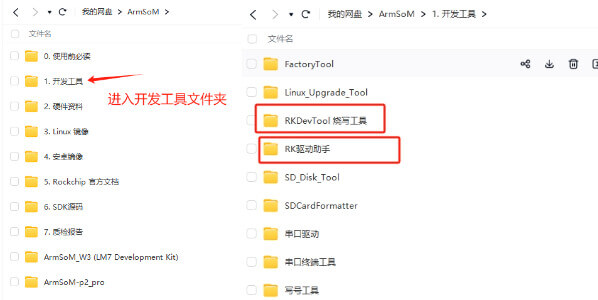
Installing Driver Assistant
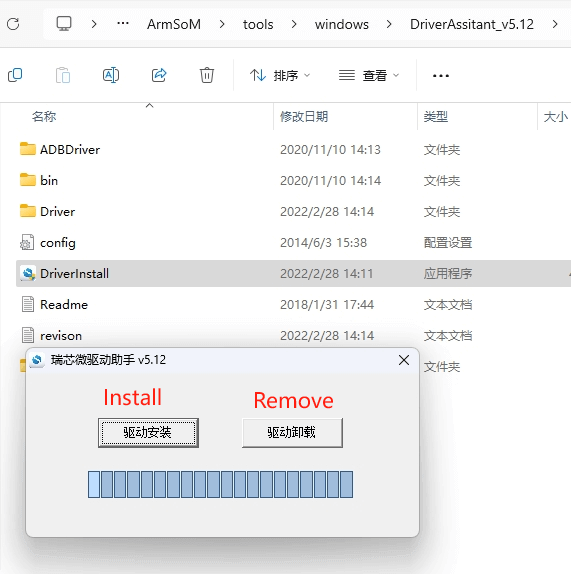
Unzip the Driver Assistant software package and double-click DriverInstall.exe to enter the driver installation interface.
Click "Driver Install" to start the installation. If you're unsure whether an old version of the driver is already installed, first click "Driver Uninstall" to remove it, then click "Driver Install."
Installing RKDevTool
RKDevTool is a dedicated USB burning tool for Rockchip products on the Windows platform, allowing you to download the system image to the product via USB.
After unzipping the package, it can be used without installation; double-click RKDevTool.exe to access the software interface.
The software has three main sections: download the image (to burn the image according to the address), upgrade the firmware, and advanced functions.
MASKROM/Loader Mode for Image Burning
This mode is suitable for products that have not had a system burned or where the burned system is corrupted and cannot run (Applicable to all situations).
We open the RKDevTool burning tool and set the product to enter burning mode.
Please refer to the product-related instructions for operations; the methods to enter Maskrom mode are generally similar across different products.

1. Prepare a Type-C cable for image burning.
2. Disconnect all possible power connections to the product, such as power cables, USB cables, etc.
3. Connect one end of the Type-C cable to the product's OTG interface and the other end to your computer's USB port, then open the RKDevTool software.
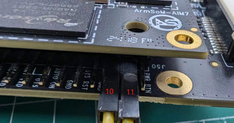
4. Short the 10 and 11 pins on the 12-pin interface (as shown) to enter loader mode, then power the product using DC.
5. Wait for the software to prompt that a MASKROM/LOADER device has been found (as shown below), then you can release the button.
6. If it does not succeed, repeat steps 2-5.
Shorting pins 10 and 11 to enter loader mode.
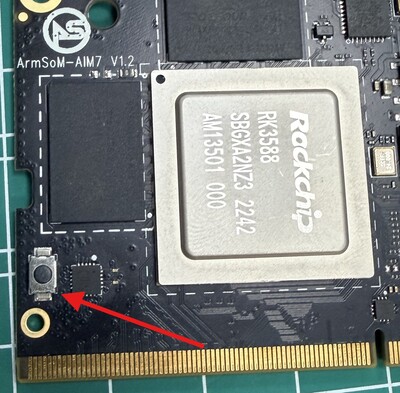
Hold down the maskrom button on the aim7 to enter maskrom mode.
Start burning the system.
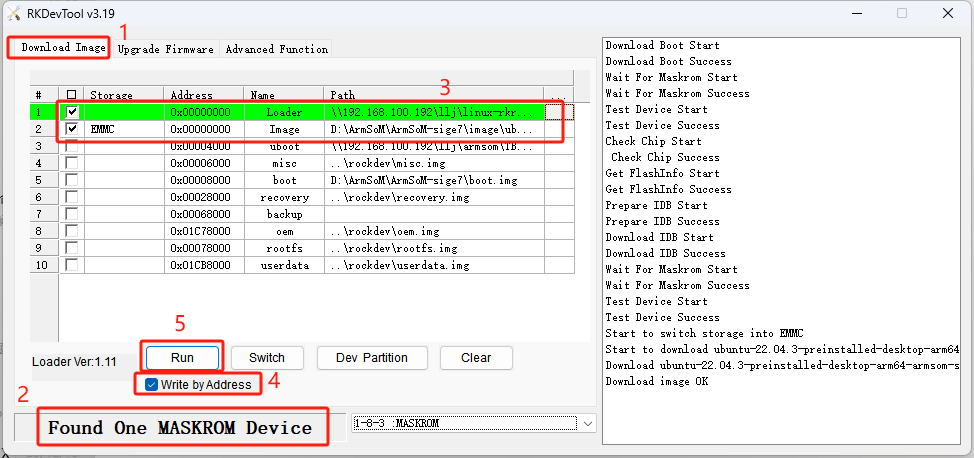
- Select the "Download Image" option.
- Confirm that the board has entered Maskrom mode.
- Click the blank cell to select the MiniLoaderAll and Image files to use; the corresponding MiniLoaderAll and Image are stored on Google Drive.
- In the "Storage" option, select the target medium EMMC, and select "Force Write by Address," then click "Execute."
- Wait for the writing to complete, after which the device will automatically reboot, as shown in the right side of the image with "Download image OK."
Burning Debian System
Using a Card Reader to Burn to MicroSD
Installing SDDiskTool
Burning the image to eMMC requires using the burning tool SDDiskTool_version.exe.
Click the link: Google Drive root folder
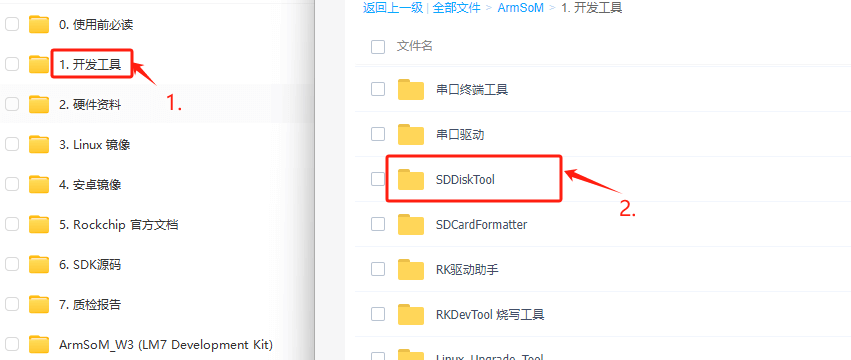
After unzipping the package, you can use it without installation; double-click SD_Firmware_Tool.exe to access the software interface.
Burning the Image
Open the executable file SDDiskTool (SD_Firmware_Tool.exe) and insert the SD card.
First, select the correct SD card to burn, then set the function mode to "SD Boot," select the image to burn, and finally click "Start" to create the burning image on the SD card.

Be patient while the SD card is being burned. If the image is large, the burning time will increase accordingly.
- Clicking "Create" may occasionally result in an error stating that it cannot burn; you can close the error window and try to start creating again. If it still doesn’t work, try formatting the SD card.
- The firmware downloaded from Google Drive needs to be extracted before loading. On Windows PCs, the tool must be run with administrator privileges to execute.
Using USB Cable to Burn to eMMC
We open the RKDevTool burning tool and set the product to enter burning mode.
1. Prepare a Type-C cable for image burning.
2. Disconnect all possible power connections to the product, such as power cables, USB cables, etc.
3. Connect one end of the Type-C cable to the product's OTG interface and the other end to your computer's USB port, then open the RKDevTool software.
4. Press and hold the Recovery button, then power the product using DC.
5. Wait for the software to prompt that a LOADER device has been found (as shown below), then you can release the button.
6. If it does not succeed, repeat steps 2-5.

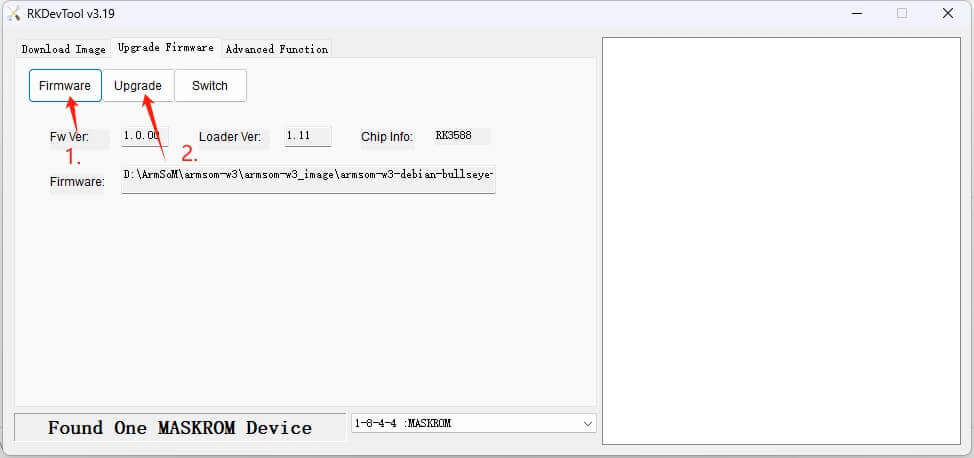
The flashing progress will be displayed on the right, and upon completion, it will prompt you:
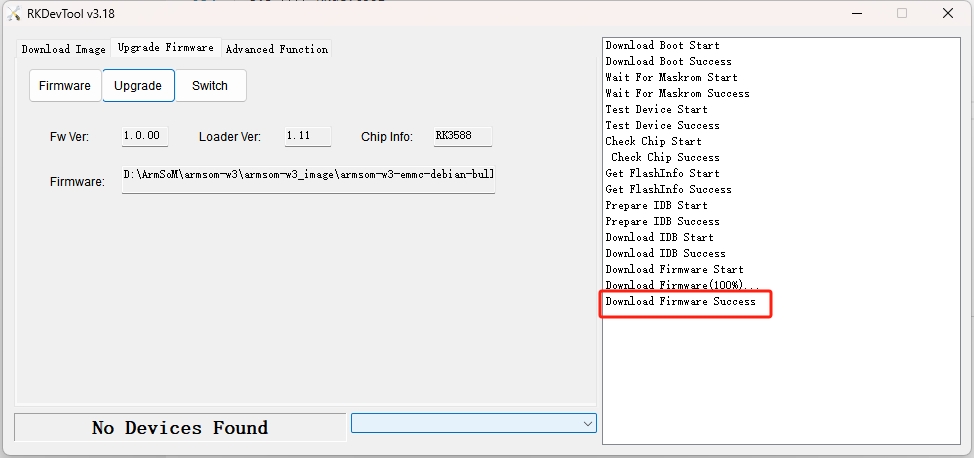
If a "Download Boot Fail" error occurs during the flashing process, or if there are errors during the process, as shown in the image, it is usually due to poor connection with the USB cable, low-quality cables, or insufficient power from the computer's USB port. Please change the USB cable or USB port on the computer to troubleshoot.
Sure! Here’s the translation:
Interface Usage
AIM5 (RK3576) and AIM7 (RK3588) share the AIM-IO carrier board; use this page for interface connections and basic operation on either module. Output examples use AIM7 with official Debian 12 / Linux 6.1. Confirm device names, GPIO numbers, and overlays for your module and image.
1. Debug Serial Port
Connect a USB-to-TTL serial adapter to the carrier board's debug header as shown below. Cross RX/TX and connect GND.
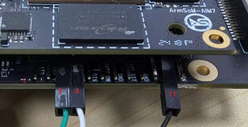
| AIM-IO debug header | Serial adapter |
|---|---|
| GND (pin 11) | GND |
| RX (pin 3) | TX |
| TX (pin 4) | RX |
These numbers refer to the debug header in the image, not the 40-pin header.
- Baud rate: 1500000
- Data bits: 8
- Stop bits: 1
- Parity: None
- Flow control: None
Configure the serial terminal, then power on the board to view boot logs and log in.
| Username | Default password |
|---|---|
root | root |
armsom | armsom |
2. Ethernet Port
- First, plug one end of the Ethernet cable into the ArmSoM-AIM’s Ethernet port and connect the other end to a router, ensuring the network is functional.
- After booting, the system will automatically assign an IP address to the Ethernet card via DHCP without any additional configuration.
- To check the IP address in the ArmSoM-AIM Linux system, use the following command:
root@armsom-aim7:/# ip a
1: lo: <LOOPBACK,UP,LOWER_UP> mtu 65536 qdisc noqueue state UNKNOWN group default qlen 1000
    link/loopback 00:00:00:00:00:00 brd 00:00:00:00:00:00
    inet 127.0.0.1/8 scope host lo
       valid_lft forever preferred_lft forever
    inet6 ::1/128 scope host
       valid_lft forever preferred_lft forever
2: eth0: <BROADCAST,MULTICAST,UP,LOWER_UP> mtu 1500 qdisc mq state UP group default qlen 1000
    link/ether c2:ed:bc:48:3b:7a brd ff:ff:ff:ff:ff:ff
    inet 192.168.10.106/24 brd 192.168.10.255 scope global dynamic noprefixroute eth0
       valid_lft 86396sec preferred_lft 86396sec
    inet6 fe80::7351:88a9:9b4c:11be/64 scope link noprefixroute
       valid_lft forever preferred_lft forever
After the ArmSoM-AIM boots, there are three ways to check the IP address:
- Connect to an HDMI display, log into the system, and use the terminal to enter the
ip acommand. - Use the debug serial port terminal to enter the
ip acommand to check the IP address. - If there is no debug serial port or HDMI display, you can check the ArmSoM-AIM’s IP address through the router’s management interface. However, this method often fails to display the ArmSoM-AIM’s IP address. If not visible, follow these troubleshooting steps:
- First, check whether the Linux system has booted properly. If the ArmSoM-AIM's green LED is solid, it generally indicates a normal boot. If only the red LED is on, the system hasn't booted correctly.
- Ensure the Ethernet cable is securely connected, or try a different cable.
- Test with another router, as many issues arise from routers not assigning IP addresses correctly or assigning them but not displaying them in the management interface.
- If no alternative router is available, connect an HDMI display or use the debug serial port to check the IP address.
It is important to note that the ArmSoM-AIM automatically assigns an IP address via DHCP without any settings required.
- Use the
pingcommand to check network connectivity.
The command to test network connectivity is as follows. You can interrupt the ping command by using the Ctrl+C shortcut:
armsom@armsom-aim7:~$ ping www.baidu.com
PING www.a.shifen.com (183.2.172.185): 56 data bytes
64 bytes from 183.2.172.185: icmp_seq=0 ttl=53 time=8.370 ms
64 bytes from 183.2.172.185: icmp_seq=1 ttl=53 time=8.917 ms
64 bytes from 183.2.172.185: icmp_seq=2 ttl=53 time=8.511 ms
64 bytes from 183.2.172.185: icmp_seq=3 ttl=53 time=8.673 ms
^C
--- www.a.shifen.com ping statistics ---
4 packets transmitted, 4 packets received, 0% packet loss
round-trip min/avg/max/stddev = 8.370/8.618/8.917/0.203 ms
3. M.2 Key E (Wi-Fi / Bluetooth)
AIM-IO provides an M.2 Key E slot. The following example uses the tested Intel AX200: Wi-Fi uses PCIe, while Bluetooth uses USB. Install the card and connect its antennas before powering on the board.
Identify the AX200
armsom@armsom:~$ lspci -nnk -s 01:00.0
Output collected from the board:
01:00.0 Network controller [0280]: Intel Corporation Wi-Fi 6 AX200 [8086:2723] (rev 1a)
        Subsystem: Intel Corporation Wi-Fi 6 AX200NGW [8086:0084]
        Kernel driver in use: iwlwifi
        Kernel modules: iwlwifi
Use lspci -nn to find the actual PCIe address first. Kernel driver in use: iwlwifi confirms that the driver is bound. If the log reports no suitable firmware found, check that the image contains /lib/firmware/iwlwifi-cc-a0-72.ucode.
Use Wi-Fi
- Start NetworkManager, enable Wi-Fi, and check the wireless interface name (
wlp1s0in this example):
armsom@armsom:~$ sudo systemctl start NetworkManager
armsom@armsom:~$ sudo nmcli radio wifi on
armsom@armsom:~$ nmcli device status
- Scan and list nearby Wi-Fi networks:
armsom@armsom:~$ sudo nmcli device wifi list ifname wlp1s0 --rescan yes
- Connect to a network and enter the password when prompted:
armsom@armsom:~$ sudo nmcli --ask device wifi connect 'YourWiFiName' ifname wlp1s0
NetworkManager saves a successful connection and reconnects on subsequent boots. Check the connection status:
armsom@armsom:~$ nmcli -f DEVICE,TYPE,STATE device
Excerpt from the board:
DEVICE          TYPE      STATE
wlp1s0          wifi      connected
- Disconnect the current Wi-Fi connection:
armsom@armsom:~$ sudo nmcli device disconnect wlp1s0
Use Bluetooth
armsom@armsom:~$ lsusb -d 8087:0029
armsom@armsom:~$ bluetoothctl show
Excerpt from the board:
Bus 004 Device 002: ID 8087:0029 Intel Corp. AX200 Bluetooth
Controller 38:7A:0E:75:1A:15 (public)
        Name: armsom
        Alias: armsom
        Class: 0x007c0000
        Powered: yes
Put the target device into discovery/pairing mode, then use bluetoothctl. Replace the example address with the address found during scanning:
armsom@armsom:~$ bluetoothctl
[bluetooth]# power on
[bluetooth]# agent on
[bluetooth]# default-agent
[bluetooth]# scan on
[bluetooth]# pair AA:BB:CC:DD:EE:FF
[bluetooth]# trust AA:BB:CC:DD:EE:FF
[bluetooth]# connect AA:BB:CC:DD:EE:FF
[bluetooth]# scan off
[bluetooth]# quit
4. HDMI
| Model | AIM7 | AIM5 |
|---|---|---|
| Resolution | 8Kp60 | 4Kp120 |
- Use an HDMI cable to connect the ArmSoM-AIM to an HDMI display.
- If the HDMI display outputs an image after the Linux system boots, the HDMI interface is functioning properly.
Note that many laptops have HDMI ports that only support output functionality. This means they cannot display HDMI output from other devices on their screens. When attempting to connect the development board's HDMI to a laptop HDMI port, please confirm whether your laptop supports HDMI input functionality. If no display is shown, first check whether the system version includes a desktop environment, as server versions only show the terminal.
5. DP (DisplayPort)
| Model | AIM7 | AIM5 |
|---|---|---|
| Resolution | 4Kp60 | 4Kp60 |
- Use a DP cable to connect the ArmSoM-AIM to a DP display.
- If the DP display outputs an image after the Linux system boots, the DP interface is functioning properly.
6. USB
AIM-IO provides four USB 3.0 Type-A ports for keyboards, mice, USB drives, and UVC cameras.
Keyboard, Mouse, and USB Speed
Connect a keyboard or mouse to use it in the desktop. Inspect the USB topology with:
armsom@armsom:~$ lsusb -t
Excerpt from the board:
/:  Bus 03.Port 1: Dev 1, Class=root_hub, Driver=xhci-hcd/1p, 5000M
    |__ Port 1: Dev 2, If 0, Class=Hub, Driver=hub/4p, 5000M
        |__ Port 4: Dev 3, If 0, Class=Mass Storage, Driver=usb-storage, 5000M
Check the speed on the actual device line: 5000M indicates USB 3.0 for this drive; 480M indicates USB 2.0. Lower speeds are normal for keyboards and mice. The root hub's speed alone does not establish the peripheral's speed.
USB Storage
armsom@armsom:~$ lsblk -o NAME,SIZE,TYPE,FSTYPE,MOUNTPOINTS /dev/sda
Output collected from the board:
NAME    SIZE TYPE FSTYPE MOUNTPOINTS
sda    29.3G disk
└─sda1 29.3G part vfat
Confirm the actual device and partition before mounting. This example uses /dev/sda1:
armsom@armsom:~$ sudo mkdir -p /mnt/usb
armsom@armsom:~$ sudo mount /dev/sda1 /mnt/usb
armsom@armsom:~$ ls /mnt/usb
# Unmount before unplugging the drive.
armsom@armsom:~$ sudo umount /mnt/usb
USB Camera
Connect a UVC-compatible USB camera and locate its node and supported formats. Do not use a MIPI camera node for this test.
armsom@armsom:~$ v4l2-ctl --list-devices
armsom@armsom:~$ v4l2-ctl -d /dev/videoX --list-formats-ext
Replace /dev/videoX with the actual UVC node. Desktop images can preview the camera in Cheese, or run the following command in a local graphical session:
armsom@armsom:~$ gst-launch-1.0 v4l2src device=/dev/videoX ! videoconvert ! autovideosink
USB Type-C Flashing
The carrier board's Type-C port connects to a computer for flashing in Loader/Maskrom mode. See Image Burning Options on this page. Power the board through the 12V DC input described above.
7. TF Card
Boot from eMMC, insert a TF/microSD card, and inspect its device and partitions. On the tested board, /dev/mmcblk1 is the TF card and /dev/mmcblk0 is eMMC; do not confuse them.
armsom@armsom:~$ lsblk -o NAME,SIZE,TYPE,FSTYPE,MOUNTPOINTS /dev/mmcblk1
armsom@armsom:~$ cat /sys/class/block/mmcblk1/device/type
Output collected from the board:
NAME         SIZE TYPE FSTYPE MOUNTPOINTS
mmcblk1     29.1G disk
├─mmcblk1p1    8M part
├─mmcblk1p2  128M part ext2
└─mmcblk1p3   29G part ext4
SD
This example card contains a system image; a data card may have different partitions. Select a partition with a filesystem from lsblk. The following example mounts the third partition read-only:
armsom@armsom:~$ sudo mkdir -p /mnt/tfcard
armsom@armsom:~$ sudo mount -o ro /dev/mmcblk1p3 /mnt/tfcard
armsom@armsom:~$ ls /mnt/tfcard
armsom@armsom:~$ sudo umount /mnt/tfcard
8. RTC
The tested AIM7 uses an HYM8563-compatible RTC on i2c4. Connect the RTC backup battery and confirm device registration:
armsom@armsom:~$ cat /sys/class/rtc/rtc0/name
armsom@armsom:~$ dmesg | grep rtc-hym8563
Excerpt from the board:
rtc-hym8563 4-0051
[    2.149494] rtc-hym8563 4-0051: rtc information is valid
[    2.156470] rtc-hym8563 4-0051: registered as rtc0
Verify that the system time is correct before writing it to the RTC:
armsom@armsom:~$ date
armsom@armsom:~$ sudo hwclock -w -f /dev/rtc0
armsom@armsom:~$ sudo hwclock -r -f /dev/rtc0
armsom@armsom:~$ sudo poweroff
Leave the RTC battery connected and disconnect only the main power. Power on again after a few minutes and use hwclock -r -f /dev/rtc0 to check that time has advanced. Disconnecting the backup battery does not test battery-backed timekeeping.
9. MIPI-CSI
Camera Ports and Overlays
AIM5 and AIM7 use the same physical ports and camera modules. The I2C addresses and full filenames below are AIM7 examples; AIM5 uses its own prefix and boot configuration:
| Module | Boot configuration | Camera overlay prefix |
|---|---|---|
| AIM5 | /boot/uEnv/uEnvarmsom-aim5-io.txt | rk3576-armsom-aim5-camera- |
| AIM7 | /boot/uEnv/uEnvarmsom-aim7-io.txt | rk3588-armsom-aim7-camera- |
Power off before connecting ribbon cables and check their orientation.
| Port | Carrier reference | Camera | I2C address | Overlay filename |
|---|---|---|---|---|
| CAM0 | J13 | IMX219 | 2-0010 | rk3588-armsom-aim7-camera-imx219-cs0-overlay.dtbo |
| CAM1 | J49 | IMX219 | 4-0010 | rk3588-armsom-aim7-camera-imx219-cs1-overlay.dtbo |
| CAM2 | J12 | OV13850 | 3-0010 | rk3588-armsom-aim7-camera-ov13850-cs2-overlay.dtbo |
| CAM3 | J24 | OV13850 | 6-0010 | rk3588-armsom-aim7-camera-ov13850-cs3-overlay.dtbo |
Edit the boot configuration for your module; this example uses AIM7:
armsom@armsom:~$ sudo nano /boot/uEnv/uEnvarmsom-aim7-io.txt
Enable only the lines for connected cameras. The following configuration enables all four:
dtoverlay=/dtb/overlay/rk3588-armsom-aim7-camera-imx219-cs0-overlay.dtbo
dtoverlay=/dtb/overlay/rk3588-armsom-aim7-camera-imx219-cs1-overlay.dtbo
dtoverlay=/dtb/overlay/rk3588-armsom-aim7-camera-ov13850-cs2-overlay.dtbo
dtoverlay=/dtb/overlay/rk3588-armsom-aim7-camera-ov13850-cs3-overlay.dtbo
For AIM5, replace rk3588-armsom-aim7-camera- in the filenames above with rk3576-armsom-aim5-camera- and edit its AIM5 uEnv file. Remove the leading # to enable a line. For initial wiring checks, enable one camera at a time before combining ports as needed. If an older image lacks these files, update the kernel package for your module.
Save and reboot:
armsom@armsom:~$ sudo reboot
Check Sensor IDs
armsom@armsom:~$ dmesg | grep imx219
armsom@armsom:~$ dmesg | grep ov13850
Excerpt from an earlier log saved on this board with all four cameras enabled:
[    3.019918] ov13850 3-0010: Detected OV00d850 sensor, REVISION 0xb2
[    3.025395] ov13850 6-0010: Detected OV00d850 sensor, REVISION 0xb2
[    3.086742] imx219 2-0010: Detected IMX000219 sensor
[    3.119883] imx219 4-0010: Detected IMX000219 sensor
Each Detected line confirms that the driver read the corresponding sensor ID.
Basic Commands and Tools
AIM5 and AIM7 use the same ArmSoM SDK, so the capture methods below apply to both. Find the target camera's ISP output node and replace /dev/videoX accordingly.
armsom@armsom:~$ v4l2-ctl --list-devices
armsom@armsom:~$ media-ctl -d /dev/mediaX -p
armsom@armsom:~$ v4l2-ctl -d /dev/videoX --list-formats-ext
Some image versions require GStreamer to be installed manually. If gst-launch-1.0 --version reports that the command is missing, run:
Before refreshing the index, check the system clock and repositories in Update the APT package source list.
armsom@armsom:~$ sudo apt-get update
armsom@armsom:~$ sudo apt-get install -y gstreamer1.0-tools gstreamer1.0-plugins-base gstreamer1.0-plugins-good gstreamer1.0-plugins-bad gstreamer1.0-x
Recording uses the SDK's Rockchip hardware encoder. Check it with gst-inspect-1.0 mpph264enc; if missing, use a matching SDK image or install its corresponding plugin.
Restart the image's 3A service before capture:
armsom@armsom:~$ sudo systemctl restart rkaiq_3A.service
Run one capture command at a time. Connect a display for preview and press Ctrl+C to stop. Recording commands include -e so the MP4 file can be finalized when stopping.
OV13850 Camera
These examples use 2112×1568 @ 30fps. Select a resolution and frame rate supported by your actual node.
Capture a frame (raw NV12, not JPEG):
armsom@armsom:~$ v4l2-ctl -d /dev/videoX --set-selection=target=crop,top=0,left=0,width=2112,height=1568 --set-fmt-video=width=2112,height=1568,pixelformat=NV12 --stream-mmap=3 --stream-to=ov13850.nv12 --stream-count=1 --stream-poll
Record video:
armsom@armsom:~$ gst-launch-1.0 -e v4l2src device=/dev/videoX num-buffers=300 ! video/x-raw,format=NV12,width=2112,height=1568,framerate=30/1 ! mpph264enc ! h264parse ! mp4mux ! filesink location=ov13850.mp4
Preview:
armsom@armsom:~$ gst-launch-1.0 v4l2src device=/dev/videoX ! video/x-raw,format=NV12,width=2112,height=1568,framerate=30/1 ! videoconvert ! autovideosink
IMX219 Camera
Capture, recording, and preview use 3280×2464. The full-resolution mode supports 15 FPS.
Capture a photo (JPEG):
armsom@armsom:~$ GST_V4L2SRC_MAX_RESOLUTION=3280x2464 gst-launch-1.0 v4l2src device=/dev/videoX num-buffers=1 io-mode=4 ! video/x-raw,format=NV12,width=3280,height=2464 ! videoconvert ! jpegenc ! filesink location=imx219.jpg
Record video:
armsom@armsom:~$ GST_V4L2SRC_MAX_RESOLUTION=3280x2464 gst-launch-1.0 -e v4l2src device=/dev/videoX num-buffers=300 io-mode=4 ! video/x-raw,format=NV12,width=3280,height=2464,framerate=15/1 ! mpph264enc ! h264parse ! mp4mux ! filesink location=imx219.mp4
Preview:
armsom@armsom:~$ GST_V4L2SRC_MAX_RESOLUTION=3280x2464 gst-launch-1.0 v4l2src device=/dev/videoX ! video/x-raw,format=NV12,width=3280,height=2464,framerate=15/1 ! videoconvert ! autovideosink
GST_V4L2SRC_MAX_RESOLUTION selects camera modes on some SDK images. If your image does not support this extension, omit the prefix and use its supported resolution and frame rate.
Preview Four Cameras Simultaneously
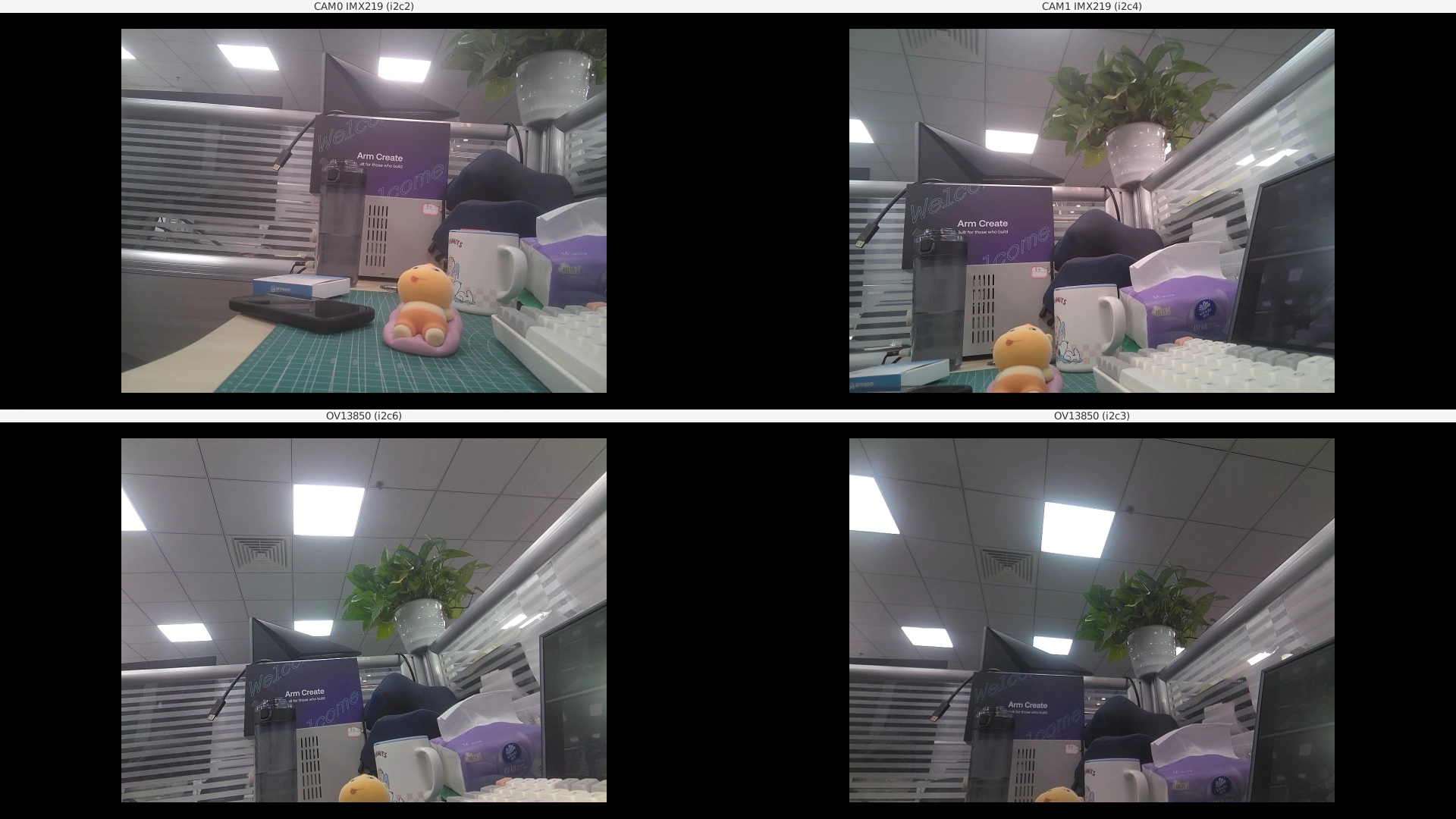
AIM7 has been tested with two IMX219 and two OV13850 cameras running together. Enable all four camera overlays above in /boot/uEnv/uEnvarmsom-aim7-io.txt and reboot first. Ensure that the IMX219 module name matches imx219_rpi-camera-v2_default.json and that the 3A service is running.
Download the four-window preview script to the board. In a local desktop terminal, enter its directory and run:
armsom@armsom:~$ sudo apt-get install -y python3-gi gir1.2-gtk-3.0 gir1.2-gstreamer-1.0 gir1.2-gst-plugins-base-1.0
armsom@armsom:~$ sudo systemctl restart rkaiq_3A.service
armsom@armsom:~$ python3 aim7-four-camera-preview.py
The script arranges four equal windows on a 1920×1080 screen, with IMX219 cameras on top and OV13850 cameras below, preserving aspect ratios. ISP output is scaled to 640×480. Measured rates were approximately 15 FPS for IMX219 and 25 FPS for OV13850. Press Ctrl+C to exit.
The script uses /dev/video53, /dev/video62, /dev/video44, and /dev/video71 from this AIM7 four-camera configuration. On other images, identify the corresponding ISP output nodes using v4l2-ctl --list-devices and media-ctl -p, then update the camera list near the beginning of the script. This example has not been verified on AIM5.
Screenshot from the test (each camera image rotated 180° to correct its orientation, with titles unchanged; 1920×1080, losslessly compressed):
10. MIPI DSI
Both modules connect displays through the carrier board MIPI DSI port, using their own panel overlays. AIM5 uses rk3576-armsom-aim5-display-800x1280-8hd-overlay.dtbo, enabled in /boot/uEnv/uEnvarmsom-aim5-io.txt. The example below uses AIM7 and rk3588-armsom-aim7-display-800x1280-8hd-overlay.dtbo; it must match the actual panel.
armsom@armsom:~$ ls /boot/dtb/overlay/rk3588-armsom-aim7-display-*.dtbo
armsom@armsom:~$ sudo nano /boot/uEnv/uEnvarmsom-aim7-io.txt
Enable the corresponding line:
dtoverlay=/dtb/overlay/rk3588-armsom-aim7-display-800x1280-8hd-overlay.dtbo
Save and reboot, then inspect the display connection and touch input devices:
armsom@armsom:~$ ls /sys/class/drm/
armsom@armsom:~$ cat /sys/class/drm/card*-DSI-*/status
armsom@armsom:~$ cat /proc/bus/input/devices
Touch input requires a matching panel, controller, and overlay.
11. FAN
Connect a fan to the carrier board's fan connector. The official device tree's pwm-fan driver adjusts it according to temperature. hwmon numbering can change, so locate pwmfan first:
armsom@armsom:~$ grep -H '^pwmfan$' /sys/class/hwmon/hwmon*/name
The tested board uses hwmon7:
armsom@armsom:~$ cat /sys/class/hwmon/hwmon7/name
armsom@armsom:~$ cat /sys/class/hwmon/hwmon7/pwm1
pwmfan
0
pwm1 is a PWM control value from 0 to 255, not an RPM reading. A value of 0 at low temperature is normal.
12. 40 PIN
The AIM-IO 40-pin header exposes multiplexed GPIO, I2C, SPI, UART, and PWM signals. The pin table and conflicts below are AIM7 examples; use the AIM5 module documentation to confirm its GPIO mapping. Available functions depend on the device tree and other connected peripherals.
| Enabled function | Physical header pins to avoid |
|---|---|
| I2C4 (RTC, CAM1, and some display touch controllers) | 3, 5 |
| CAM0 I2C2 | 27, 28 |
| OV13850 reset, PWDN, and clocks | 11, 15, 31, 33, 36 |
| The MIPI DSI display configuration above | 7, 32 |
Do not change pins used by a camera or RTC to GPIO outputs. Check current ownership before use:
armsom@armsom:~$ sudo cat /sys/kernel/debug/gpio
armsom@armsom:~$ sudo cat /sys/kernel/debug/pinctrl/pinctrl-rockchip-pinctrl/pinmux-pins
See GPIO Usage, UART Usage, SPI Usage, and PWM Usage, selecting signals from your module's pin definition. Power off before connecting peripherals and confirm signal voltage against the carrier pin definition and schematic.
Product Certificate
CE / FCC / RoHS
Supply Statement
The ArmSoM-AIM7 will be produced at least until August 2034.
Purchase Samples
CrowdSupply : https://www.crowdsupply.com/armsom/rk3588-ai-module7
ArmSoM online shop: https://www.armsom.org/product-page/aim7
ArmSoM Aliexpress online shop: https://www.aliexpress.com/item/1005012690621621.html
ArmSoM Taobao shop: https://item.taobao.com/item.htm?id=1066393300562
OEM&ODM, please contact: sales@armsom.org
What do others say about the AIM7?
- itsfoss: ArmSoM AIM7: A Promising Upcoming Rockchip Device for AI Development
- taoofmac: The ArmSom AI Module 7
- Technically Unsure: ArmSoM AIM7 & AIMIO (RK3588): Benchmarks & DeepSeek in Action
- sbc compare: AIM7 Benchmark Comparison on sbc.compare
Notes
- Before handling the device, please ensure you wear an anti-static wrist strap or take electrostatic discharge measures to prevent damage to the development board.
- Assembly should be performed in an electrostatic-safe environment, avoiding operations in dry and low-humidity conditions.
- When not in use, store the device in an anti-static bag and keep it in a suitably temperature-controlled, low-humidity environment to prevent static electricity buildup.
- When handling the device, avoid friction or collisions to prevent the generation of static electricity that could cause damage.
- When holding the device, try to avoid direct contact with the chips on the mainboard to prevent static damage.
- Do not plug or unplug wires or other devices while the device is operating to avoid damage from electrical surges.
- When connecting or disconnecting the GPIO/MIPI expansion interfaces, make sure to turn off the power and disconnect the power cable to prevent damage from electrical current.
Without effective cooling measures, the surface temperature of the main chip may exceed 60 degrees. When handling the device, please avoid direct contact with the SoC and surrounding power inductors to prevent burns. Ensure that the environment is well-ventilated during operation to prevent localized heat buildup, which could lead to overheating. Additionally, do not place the device in direct sunlight. It is recommended to choose between the official cooling fan, heat sink, or third-party cooling kits based on specific usage conditions to ensure optimal cooling performance.