ArmSoM-CM7s Product Introduction
Let's get to know the ArmSoM-CM7s and ArmSoM-CM7s-IO in 5 minutes
CM7s Introduction
ArmSoM-CM7s Core Board: compact in size, powerful in performance, built specifically for deep embedded scenarios. The board comes with the Rockchip RK3588S 8-core 64-bit flagship processor (4×Cortex-A76 @ 2.4GHz + 4×Cortex-A55 @ 1.8GHz), built on an advanced 8nm process, offering great computing power and excellent energy efficiency. It features an ARM Mali-G610 high-performance GPU, fully compatible with OpenGL ES 3.2, OpenCL 2.2, and Vulkan 1.2 graphics APIs. It also has a powerful 6 TOPS NPU, supporting INT4/INT8/INT16 mixed-precision computing, easily handling edge AI inference.
The module offers a variety of bus and expansion interfaces, supports eMMC flash memory of different capacities, and can be widely used in industrial IoT, edge computing, and smart devices.

Relying on a strong ecosystem and a variety of expansion accessories, ArmSoM can help users easily go from ideas to prototypes to mass production, making it an ideal creative platform for makers, dreamers, and hobbyists.
armsom-cm7s v1.1 CN2 pins 2 and 4 aren't working, will be fixed in the next v1.2 version
Key parameters
- SOC:Rockchip RK3588S (8nm LP process)
- CPU:8-core 64-bit(4×Cortex-A76@2.4GHz + 4×Cortex-A55@1.8GHz)
- GPU:ARM Mali-G610 3D GPU,supports OpenGL ES3.2 / OpenCL 2.2 / Vulkan 1.2
- NPU:6 TOPS computing power, supports mixed INT4/INT8/INT16 operations
- RAM:2/4/8/16/32GB LPDDR4/4X
- eMMC:32/64/128/256GB eMMC
- interface:On-board 3×100-pin connector (DF40C-100DP-04V), supports multiplexed buses and control pins like Type-C/DP1.4, HDMI 2.1/eDP1.3, MIPI DPHY/CSI, USB 3.0/2.0, SATA III/PCIe 2.0, SDIO 3.0/RGMII, SDMMC, and I2C/I2S/UART/SPI/CAN/PWM/GPIO.
- Power supply:Input DC 5V (MAX 2500mA); Output DC 3.3V/1.8V (MAX 600mA)
- Size:55 x 40 x 1.6 mm
- Input:DC 5V MAX 2500mA
- Output: DC 3.3 V max. 600 mA and DC 1.8 V max. 600 mA
- PCB size:55 x 40 x 1.6 mm (L x W x H)
CM7s Hardware Info
Hardware interface
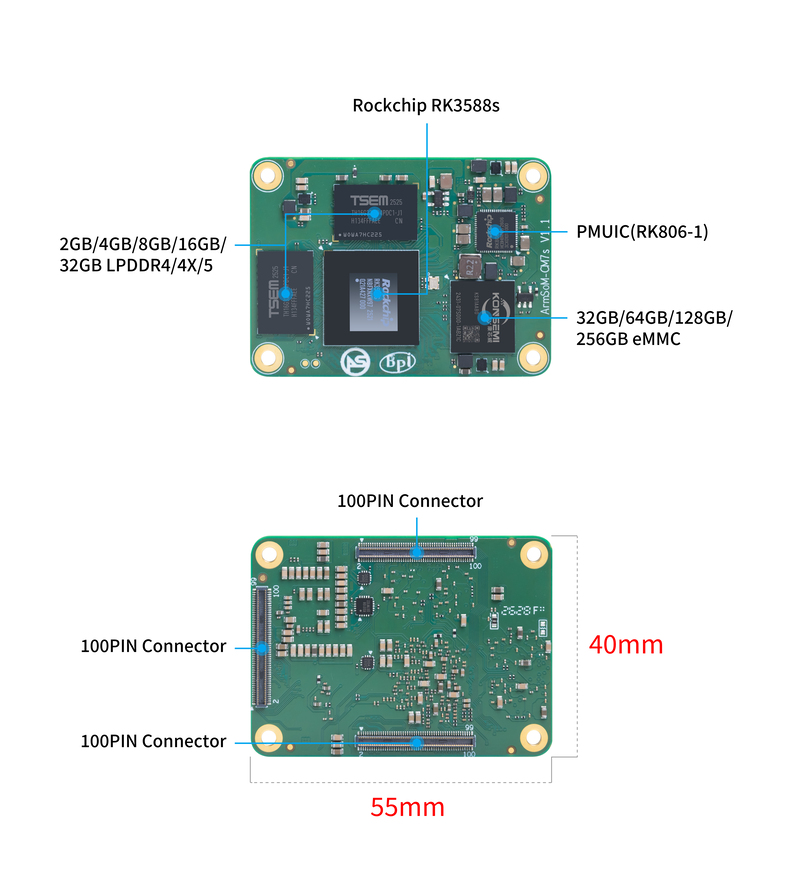
- Designed as a board-to-board connector
ArmSoM CM7s vs Raspberry Pi CM5
Here's a comparison chart of the specs for the ArmSoM CM7s and the Raspberry Pi CM5:
| Specification | ArmSoM CM7s | Raspberry Pi CM5 |
|---|---|---|
| Processor | RK3588S SoC | Broadcom BCM2712 |
| CPU Architecture | Quad-core ARM Cortex-A76 & Quad-coreCortex-A55 | Quad-core ARM Cortex-A76 |
| GPU | ARM Mali-G610 MP4 | VideoCore VII |
| NPU | 6 TOPS computing power | No built-in NPU |
| Memory | Supports up to 32GB LPDDR4X | 2GB, 4GB, 8GB, 16GB LPDDR4 |
| Storage | eMMC storage (optional capacity) | eMMC storage (optional capacity) |
| Display Output | 1x HDMI 2.1, 1x DP 1.4 | 2x HDMI 2.0 |
| Video Resolution | Supports 8K@60fps | Supports 4K@60fps |
| Network Interface | 1x Gigabit Ethernet port | 1x Gigabit Ethernet port |
| USB Ports | 1x USB3.0,3x USB2.0 | 2xUSB3.0,1xUSB2.0 |
| GPIO | 40 pin GPIO | 40 pin GPIO |
| Expandability | 2x PCIE2.1/SATA3 | 1x PCIe 2.0 |
| Camera Interface | 1x 4-channel MIPI CSI, 2x 2-channel MIPI CSI | 2x 4-channel MIPI CSI |
| Display Interface | 1x 4-channel MIPI DSI | 2x 4-channel MIPI DSI |
| Power Input | 5V | 5V |
| Dimensions | 55mm x 40mm | 55mm x 40mm |
| Operating System Support | Debian, Android, Ubuntu, Armbian, etc. | Raspberry Pi OS, Ubuntu, etc. |
| Primary Use Cases | High-end tablets, edge computing, AI, cloud computing, AR/VR, smart security, smart home, and more | Embedded systems, industrial control, AI/machine learning, digital signage, IoT, edge computing |
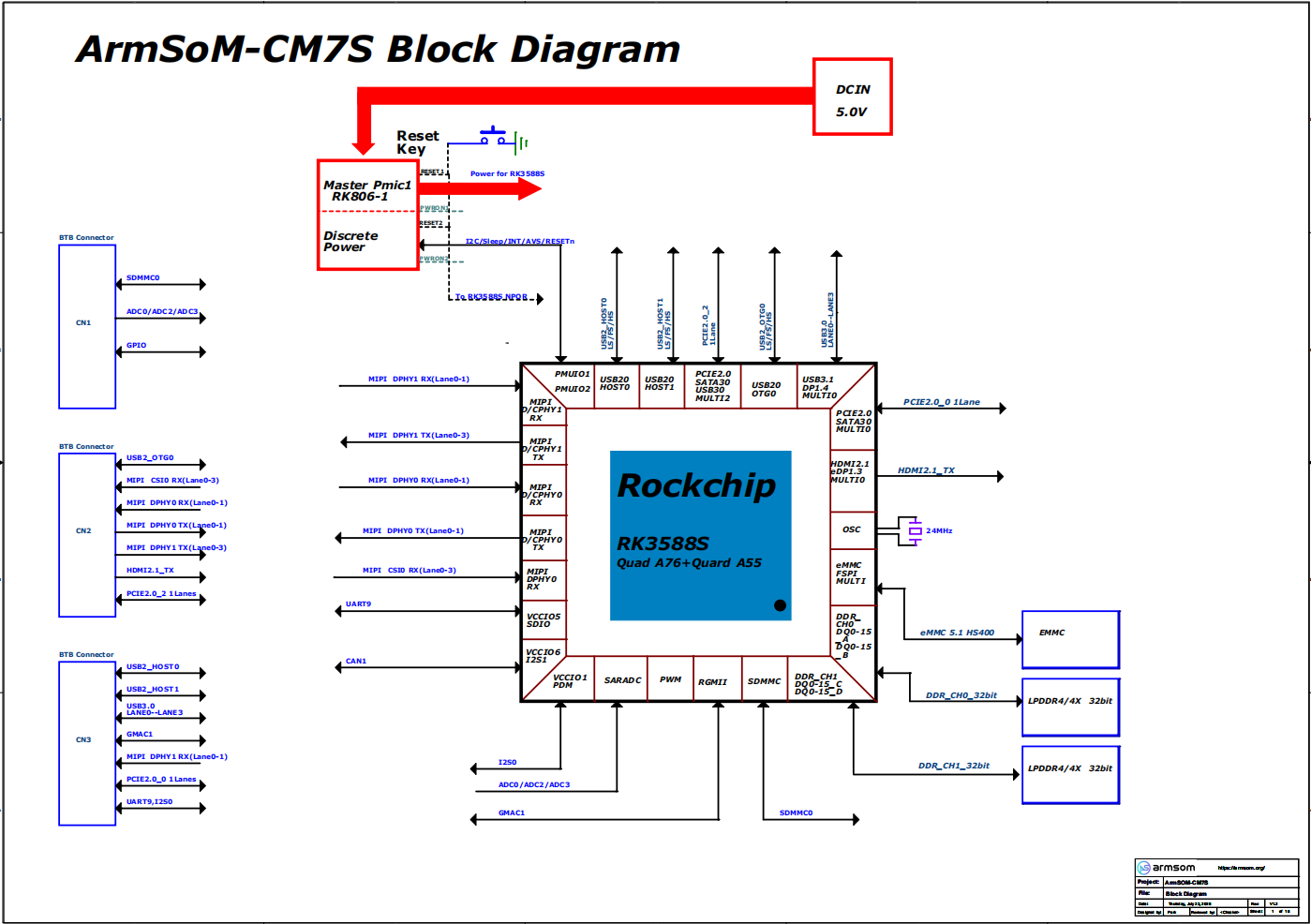
Product block diagram
Hardware Specs
| Category | Function |
|---|---|
| SOC | |
| CPU | |
| GPU | |
| NPU | |
| VPU/Codec | |
| ISP | |
| RAM | |
| Flash | |
| Display | |
| Camera | |
| Network | |
| PCIe | |
| USB | |
| Audio | |
| Others |
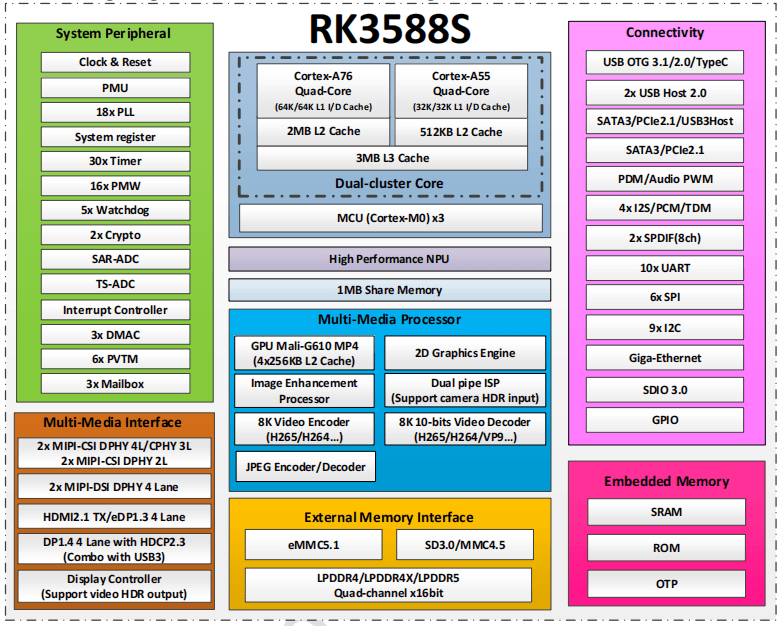
RK3588S Block Diagram
RK3588S Block Diagram
Pin Definition
ArmSoM-CM7s_Pinouthardware documentation
Get CM7s schematics, DXF, and other hardware materials
Google Drive linkCM7s-IO Introduction
The CM7s-IO is the IO board for the ArmSoM CM7s, measuring 100x79x41 mm. It's great for quickly evaluating the features of the ArmSoM CM7s platform, debugging peripheral drivers, and developing system prototypes. It can also serve as a reference hardware design for products like industrial gateways, edge AI inference terminals, and multimedia interactive devices, helping users smoothly transition from prototyping to mass deployment.
CM7s-IO Hardware Info
Hardware Specs
The CM7s-IO board is an expansion board designed specifically for the CM7s computing module, aimed at helping with system and embedded board development.
- 1x HDMI output, 1x Type-C (DP) output
- 4x USB 3.0 Type-A
- Supports Gigabit Ethernet RJ45
- Firmware flashing and device mode via USB Type-C
- GPIO: 40-pin header
- Power connector: DC barrel jack for 12V power input
- Expansion: M.2 (M key, supports PCIe), microSD
- MIPI DSI: 1x 4-lane MIPI DSI, supports up to 4K@60fps (x4)
- MIPI CSI0: 1x 4-lane MIPI CSI, up to 2.5Gbps per lane
- MIPI CSI1: 1x 2-lane MIPI CSI, up to 2.5Gbps per lane
- Others: HPOUT, FAN, VRTC
- Dimensions: 100 x 79 x 1.6 mm (3.94 × 3.11 × 0.06 inches)
- Weight: 60g
Hardware interface
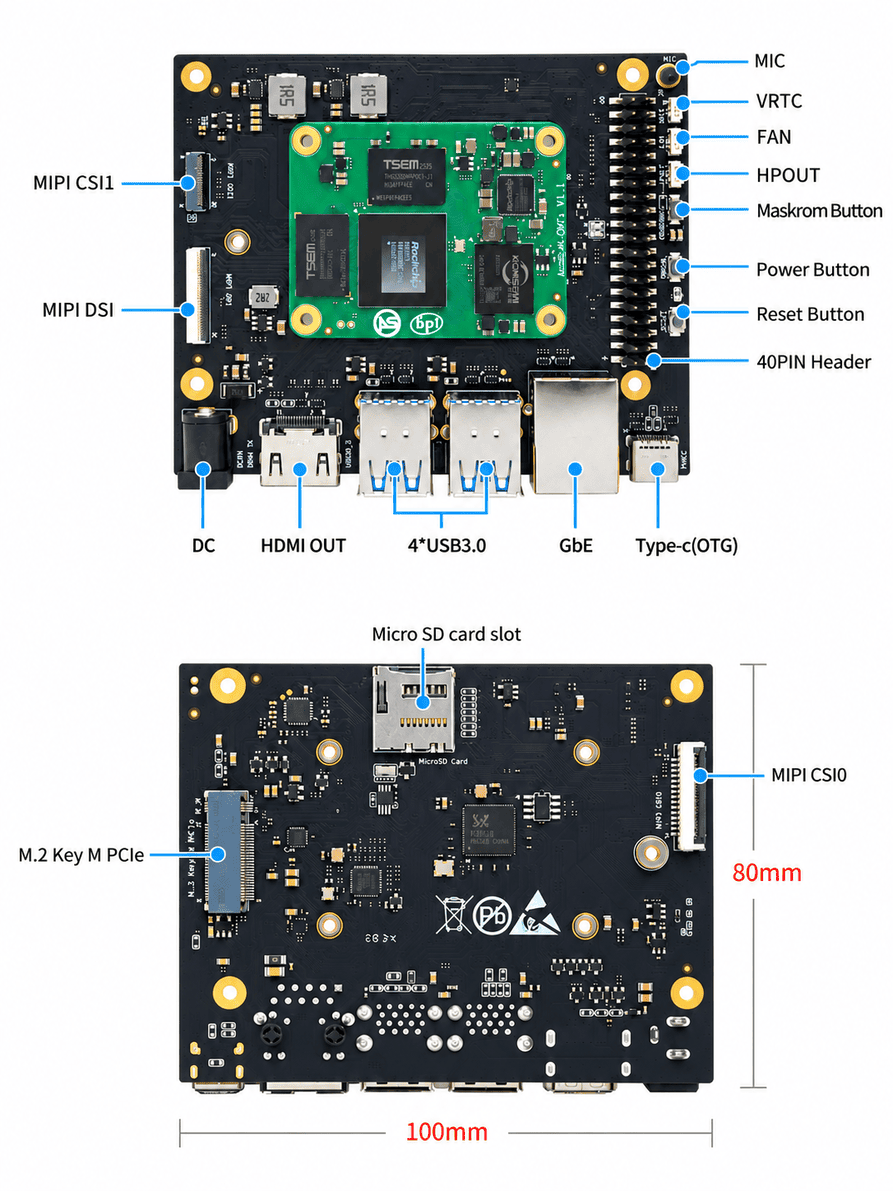
The CM7s-IO Board uses 12V DC power.
Pin Definition
40-PIN Socket
| GPIO number | Function | Pin | Pin | Function | GPIO number |
|---|---|---|---|---|---|
| +3.3V | 1 | 2 | +5.0V | ||
| 63 | GPIO1_D7 / PWM15_IR_M3 / UART1_CTSN_M1 / I2C8_SDA_M2 | 3 | 4 | +5.0V | |
| 62 | GPIO1_D6 / PWM14_M2 / UART1_RTSN_M1 / I2C8_SCL_M2 | 5 | 6 | GND | - |
| 39 | GPIO1_A7 / PWM3_IR_M3 / SPI2_CS0_M0 / PDM1_SDI0_M1 | 7 | 8 | UART2_TX_M0 / GPIO0_B5 / I2S1_MCLK_M1 / I2C1_SCL_M0 | 13 |
| - | GND | 9 | 10 | UART2_RX_M0 / GPIO0_B6 / I2S1_SCLK_M1 / I2C1_SDA_M0 | 14 |
| 130 | GPIO4_A2 / I2S1_LRCK_M0 / SPI0_CLK_M1 | 11 | 12 | GPIO3_B2 / UART2_RX_M2 / I2S2_SDI_M1 / PWM3_IR_M1 | 106 |
| 13 | GPIO4_A3 / UART0_TX_M2 | 13 | 14 | GND | |
| 18 | GPIO0_C2 | 15 | 16 | GPIO1_A0 / UART6_RX_M1 / SPI4_MISO_M2 / I2C2_SDA_M4 | 32 |
| +3.3V | 17 | 18 | GPIO1_A1 / UART6_TX_M1 / SPI4_MOSI_M2 / I2C2_SCL_M4 | 33 | |
| 42 | GPIO1_B2 / UART4_RX_M2 / SPI0_MOSI_M2 / PDM1_SDI3_M1 | 19 | 20 | GND | - |
| 41 | GPIO1_B1 / SPI0_MISO_M2 / PDM1_SDI2_M1 | 21 | 22 | GPIO1_B0 / SPI2_CS1_M0 / PDM1_SDI1_M1 | 40 |
| 43 | GPIO1_B3 / UART4_TX_M2 / SPI0_CLK_M2 / PDM1_CLK1_M1 | 23 | 24 | GPIO1_B4 / UART7_RX_M2 / SPI0_CS0_M2 / PDM1_CLK0_M1 | 44 |
| - | GND | 25 | 26 | GPIO1_B5 / UART7_TX_M2 / SPI0_CS1_M2 | 45 |
| 57 | GPIO1_D1 / SPI1_MOSI_M2 / UART6_RX_M2 / I2C7_SDA_M0 / PDM0_SDI1_M0 / I2S0_SDO2 / I2S0_SDI3 | 27 | 28 | GPIO1_D0 / SPI1_MISO_M2 / UART6_TX_M2 / I2C7_SCL_M0 / I2S0_SDO1 | 56 |
| 58 | GPIO1_D2 / SPI1_CLK_M2 / UART4_TX_M0 / PWM0_M1 / I2C1_SCL_M4 / PDM0_SDI2_M0 / I2S0_SDO3 / I2S0_SDI2 | 29 | 30 | GND | - |
| 59 | GPIO1_D3 / SPI1_CS0_M2 / UART4_RX_M0 / PWM1_M1 / I2C1_SDA_M4 / PDM0_SDI3_M0 / I2S0_SDI1 | 31 | 32 | GPIO4_B2 / CAN1_RX_M1 / PWM14_M1 / I2S1_SDO1_M0 / UART8_RTSN_M0 / SPI0_CS0_M1 / I2C7_SCL_M3 | 138 |
| 139 | GPIO4_B3 / CAN1_TX_M1 / PWM15_IR_M1 / I2S1_SDO2_M0 / UART8_CTSN_M0 / I2C7_SDA_M3 | 33 | 34 | GND | - |
| 52 | GPIO1_C4 / SPI4_CS1_M0 / PWM11_IR_M2 / I2C2_SDA_M3 / PDM0_CLK1_M0 | 35 | 36 | GPIO1_D5 / SPI1_CS1_M2 / PDM0_SDI0_M0 | 61 |
| 54 | GPIO1_C6 / PWM15_IR_M2 / I2C4_SDA_M4 / PDM0_CLK0_M0 | 37 | 38 | GPIO0_C4 / I2C4_SDA_M2 / PDM0_CLK1_M1 / UART0_RX_M0 / PWM2_M0 | 20 |
| - | GND | 39 | 40 | GPIO0_C5 / I2S1_SDI0_M1 / I2C4_SCL_M2 / PWM4_M0 / UART0_TX_M0 | 21 |
FAN
| Pin | Assignment | Description |
|---|---|---|
| 1 | VCC_5V0 | 5V Power ouput |
| 2 | GND | GND |
| 3 | PWM | PWM Control |
HPOUT
| Pin | Assignment | Description |
|---|---|---|
| 1 | AOR | Right channel |
| 2 | AOL | Left channel |
| 3 | GND | GND |
VRTC
0.8mm connector(J27)
| Pin | Assignment | Description |
|---|---|---|
| 1 | + | Positive electrode |
| 2 | - | negative electrode |
Getting started
CM7s-IO User Manual
How to start using your CM7s Kit
Development Materials
SDK source code
ArmSom-bsp
Building a Linux System
Armbian
Armbian Linux build framework
CM7s kernel
Improved Rockchip Linux
CM7s uboot
ArmSoM/u-boot
RKNN-LLM
AI models to Rockchip chips
Cloud drive link
Google Drive links, including software information and hardware information:
Google Drive linkOfficial mirror
The ArmSoM team uses Debian bullseye as the official operating system.How do I flash a system image?📤📤
The following systems have been officially tested and verified by ArmSoM:
| logo | Description | Cloud drive path |
|---|---|---|
 | debian12 for CM7s-IO : Debian 12 brings thousands of new and updated packages, supporting a variety of desktop environments and processor architectures (including 32-bit and 64-bit PCs, ARM, MIPS, and PowerPC). But one of the biggest changes is that the Linux kernel has been upgraded from version 5.10 to 6.1 LTS. | ArmSoM->ArmSoM-CM7s->software |
 | ubuntu22.04 for CM7s-IO : Ubuntu 22.04, code-named 'Jammy Jellyfish', is a version officially released by Canonical on April 21, 2022. | ArmSoM->ArmSoM-CM7s->software |
Third-party mirror
| logo | Description | Download |
|---|---|---|
 | Armbian for CM7s-IO: Armbian is a computing build framework that lets users create ready-to-use images with working kernels based on various single-board computer configurations. It provides a variety of pre-built images for some supported single-board computers, usually based on Debian or Ubuntu. |
User Manual
1. Preparation for getting started
Before you start using the ArmSoM-CM7s-IO product, please get the following items ready
Tool Preparation
- Power supply
- System Installation (Choose One)
- Onboard eMMC startup
- Flashing the USB Type-C cable, use a 12V power adapter to supply power to the motherboard; to write an image from the CM7s-IO Type-C port to the CM7s, you need to connect the CM7s-IO and PC with a USB Type-C cable, and at the same time use the 12V power adapter to power the CM7s-IO through its DC port.
- MicroSD card/TF card boots
- MicroSD card/TF card, Class 10 or above, at least 8GB SDHC, and card reader
- Here are the high-speed TF cards tested and verified by the ArmSoM team
- SanDisk 32GB TF (MicroSD) Dashcam & Security Monitoring Dedicated Storage Card (Recommended for Long-Term Operation)
- SanDisk 32GB TF (MicroSD) Storage Card for Dashcams & Security Monitoring (Recommended for Long-Term Use)
- SanDisk TF 8GB Class10 microSD
- SanDisk TF 128G Class10 microSD XC TF 128G 48MB/S:
- Onboard eMMC startup
You can set up the CM7s as an interactive computer with a desktop, or as a headless computer that can only be accessed over the network. To set up the CM7s as a headless computer, you'll configure the hostname, user account, network connection, and SSH during the initial OS installation. If you want to use the CM7s directly, you'll need the following extra accessories:
Optional options
- Keyboard & Mouse
- HDMI monitor and HDMI cable
- Ethernet cable
- Camera module
- For the 4-lane camera, we recommend the camera-module1 module (OV13850).
- For the 2-lane camera, we recommend the camera-module-v2 module (IMX219).
- LCD display
- We recommend Display 10 HD.
- 3.5mm wired headphones.
Power supply
- Supports DC 12V power adapter, 2.5mm
Account needed to log in
| Username | Password |
|---|---|
| root | root |
| armsom | armsom |
2. Choose Burning Method
3. Interface Usage
If this is your first time using the CM7s Kit, please get familiar with the products first. CM7s Hardware interface and CM7s-IO Hardware interface,so that you can better understand the following content.
3.1 Debugging Serial Port
Use a USB-to-serial chip (CH340) to connect the TTL serial cable to the 40-pin on CM7s-IO:
| CM5-IO | Connect | Serial Module |
|---|---|---|
| GND (pin 6) | ---> | GND |
| TX (pin 8) | ---> | RX |
| RX (pin 10) | ---> | TX |
Serial Communication Parameters
- Baud rate: 1500000
- Data bits: 8
- Stop bits: 1
- Parity: None
- Flow control: None
3.2 Ethernet Port
- First, plug one end of the Ethernet cable into the ArmSoM-CM7s-IO's Ethernet port, and plug the other end into the router, making sure the network is working properly.
- Once the system starts, it will automatically assign an IP address to the Ethernet card via DHCP, with no other configuration needed.
- On the ArmSoM-CM7s Linux system, the command to check the IP address is shown below, where end1 is the name of the Ethernet device.
armsom@armsom:~$ ip a
1: lo: <LOOPBACK,UP,LOWER_UP> mtu 65536 qdisc noqueue state UNKNOWN group default qlen 1000
    link/loopback 00:00:00:00:00:00 brd 00:00:00:00:00:00
    inet 127.0.0.1/8 scope host lo
       valid_lft forever preferred_lft forever
    inet6 ::1/128 scope host noprefixroute
       valid_lft forever preferred_lft forever
2: dummy0: <BROADCAST,NOARP> mtu 1500 qdisc noop state DOWN group default qlen 1000
    link/ether 46:fc:71:98:e2:45 brd ff:ff:ff:ff:ff:ff
3: end1: <BROADCAST,MULTICAST,UP,LOWER_UP> mtu 1500 qdisc mq state UP group default qlen 1000
    link/ether d6:3c:08:0f:a4:05 brd ff:ff:ff:ff:ff:ff
    inet 192.168.1.156/24 brd 192.168.1.255 scope global dynamic noprefixroute end1
       valid_lft 43188sec preferred_lft 43188sec
    inet6 fd45:d3b4:e549::8a2/128 scope global dynamic noprefixroute
       valid_lft 43186sec preferred_lft 43186sec
    inet6 fd45:d3b4:e549:0:54c0:d3b4:6f75:62be/64 scope global dynamic noprefixroute
       valid_lft 5386sec preferred_lft 2686sec
    inet6 fe80::aeef:d7f3:1189:902b/64 scope link noprefixroute
       valid_lft forever preferred_lft forever
After the CM7s starts up, there are three ways to check the IP address:
- Connect an HDMI monitor, log into the system, and use the terminal to enter the
ip acommand to check the IP address. - Connect a debug serial port and use the terminal to enter the
ip acommand to check the IP address. - If you do not have a debug serial port or an HDMI monitor, you can also check the IP address of the CM5 Kit's Ethernet port through the router's management interface. However, sometimes the IP address may not be visible on the router. If the IP address is not visible, troubleshoot as follows:
- First, check if the Linux system has started normally. If the green light on the CM5 Kit is steady, it has generally started correctly.
- Check if the Ethernet cable is securely connected, or try a different cable.
- Try using a different router, as issues have been encountered where routers cannot properly assign IP addresses or the assigned IP address does not show up on the router.
- If no other router is available, you will need to connect an HDMI monitor or use a debug serial port to check the IP address.
Note that DHCP automatic IP assignment on the CM7s does not require any configuration.
- Use the ping utility to check network connectivity.
The following command tests network connectivity. You can stop ping by pressing Ctrl+C.
armsom@armsom:~$ sudo ping -I end1 www.baidu.com
PING www.wshifen.com (103.235.46.96) from 192.168.1.156 end1: 56(84) bytes of data.
64 bytes from 103.235.46.96 (103.235.46.96): icmp_seq=1 ttl=44 time=311 ms
64 bytes from 103.235.46.96 (103.235.46.96): icmp_seq=2 ttl=44 time=311 ms
64 bytes from 103.235.46.96 (103.235.46.96): icmp_seq=3 ttl=44 time=312 ms
64 bytes from 103.235.46.96 (103.235.46.96): icmp_seq=5 ttl=44 time=312 ms
64 bytes from 103.235.46.96 (103.235.46.96): icmp_seq=6 ttl=44 time=311 ms
^C
--- www.wshifen.com ping statistics ---
6 packets transmitted, 5 received, 16.6667% packet loss, time 5021ms
rtt min/avg/max/mdev = 311.040/311.447/311.866/0.296 ms
Only regular users need to use sudo; root does not.
3.3 HDMI
CM7s-IO supports HDMI up to 8Kp60.
- Connect the CM7s-IO to an HDMI monitor using an HDMI cable.
- After booting Linux, image output on the HDMI monitor indicates that the HDMI port is working properly.
Note: Although many laptops have an HDMI port, it is usually output-only and does not support HDMI input. This means the HDMI output of another device cannot be displayed on the laptop screen. Before connecting the development board's HDMI output to a laptop, make sure the laptop supports HDMI input. If there is no HDMI display, first check whether the installed system includes a desktop environment. A server version displays only the terminal.
HDMI-to-VGA Display Test
- Prepare the following accessories:
- HDMI-to-VGA adapter
- A VGA cable and a monitor with a VGA port
- The HDMI-to-VGA display test is shown below.
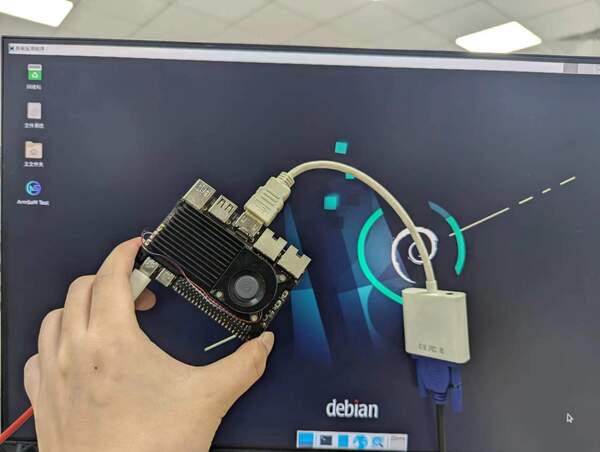
When using HDMI-to-VGA display output, no settings are required on the CM5 Kit or in Linux; the development board's HDMI output only needs to work properly. If the test fails, check the HDMI-to-VGA adapter, VGA cable, and monitor.
3.4 USB
Testing with a USB Mouse or Keyboard
- Connect a USB keyboard to a USB port on the CM7s.
- Connect the CM7s to an HDMI monitor.
- If the mouse or keyboard can operate the system normally, the USB port is working properly (a mouse can only be used with a desktop system).
Testing with a USB Storage Device
- First, connect a USB flash drive or USB external hard drive to a USB port on the ArmSoM-CM7s.
- Run the following command. If an
sdXdevice appears in the output, the USB drive has been detected successfully.
armsom@armsom:~$ cat /proc/partitions | grep "sd*"
major minor  #blocks  name
   8        0   30720000 sda
   8        1   30718976 sda1
- Use the
mountcommand to mount the USB drive under/mnt, then you can view its files.
armsom@armsom:~$ mkdir -p /test
armsom@armsom:~$ sudo mount /dev/sda1 /test/
mount: /test: /dev/sda1 already mounted on /test.
- After mounting, use
df -hto view the USB drive's capacity usage and mount point.
armsom@armsom:/$ df -h | grep "sd"
/dev/sda1        30G   64K   30G   1% /test
3.5 M.2 Key M
The CM7s-IO provides an M.2 Key M connector:
- There is an M.2 Key M connector on the back of the product. The board has a standard M.2 2280 mounting hole for an M.2 2280 NVMe SSD.
Note: This M.2 interface does not support M.2 SATA SSDs.
After connecting the NVMe device, try mounting it to a newly created directory. A successful mount indicates that it is working.
root@armsom:/# mkdir temp
root@armsom:/# mount /dev/nvme0n1 temp
3.6 Micro SD card slot
The CM7s-IO has a standard onboard microSD card slot, primarily used as a system boot drive or for additional storage.
To use an SD card as the system boot drive, insert the prepared bootable SD card into the Micro SD card slot before powering on the board. The CM7s will boot from the SD card first.
To use the SD card for additional storage, follow the steps below. First, check the log messages generated when the SD card is inserted:
armsom@armsom:~$ [  293.228591] mmc_host mmc1: Bus speed (slot 0) = 148500000Hz (slot req 150000000Hz, actual 148500000HZ div = 0)
[  293.309039] dwmmc_rockchip fe2c0000.mmc: Successfully tuned phase to 155
[  293.309114] mmc1: new ultra high speed SDR104 SDHC card at address 0001
[  293.310505] mmcblk1: mmc1:0001 ASTC 7.44 GiB
[  293.326321]  mmcblk1: p1 p2
The output shows that the system has detected the inserted SD card (mmcblk1, capacity 7.44 GiB, with partitions p1 and p2). Next, check the SD card device information.
armsom@armsom:~$ sudo fdisk -l /dev/mmcblk1
Disk /dev/mmcblk1: 7.44 GiB, 7990149120 bytes, 15605760 sectors
Units: sectors of 1 * 512 = 512 bytes
Sector size (logical/physical): 512 bytes / 512 bytes
I/O size (minimum/optimal): 512 bytes / 512 bytes
Disklabel type: gpt
Disk identifier: BDFDC9CF-2FC3-46BB-AF10-C9DF254BB1E2

Device           Start      End  Sectors  Size Type
/dev/mmcblk1p1   32768  1081343  1048576  512M Linux extended boot
/dev/mmcblk1p2 1081344 15605726 14524383  6.9G Linux filesystem
The filesystem partition is /dev/mmcblk1p2. Mount the SD card as follows:
armsom@armsom:~$ sudo mkdir -p /mnt/sdcard
armsom@armsom:~$ sudo mount /dev/mmcblk1p2 /mnt/sdcard
[  491.938107] EXT4-fs (mmcblk1p2): recovery complete
[  491.939897] EXT4-fs (mmcblk1p2): mounted filesystem with ordered data mode. Quota mode: disabled.
mount: (hint) your fstab has been modified, but systemd still uses
       the old version; use 'systemctl daemon-reload' to reload.
armsom@armsom:~$ df -h /mnt/sdcard
Filesystem      Size  Used Avail Use% Mounted on
/dev/mmcblk1p2  6.8G  6.6G     0 100% /mnt/sdcard
armsom@armsom:~$ cd /mnt/sdcard/
armsom@armsom:/mnt/sdcard$ ls
bin   dev  home  lost+found  mnt  proc  run   snap  swapfile  tmp  var
boot  etc  lib   media       opt  root  sbin  srv   sys       usr
3.7 Audio
1. View the system's sound cards.
root@armsom:~# aplay -l
**** List of PLAYBACK Hardware Devices ****
card 0: rockchipdp0 [rockchip-dp0], device 0: rockchip-dp0 spdif-hifi-0 [rockchip-dp0 spdif-hifi-0]
  Subdevices: 1/1
  Subdevice #0: subdevice #0
card 1: rockchiphdmi0 [rockchip-hdmi0], device 0: rockchip-hdmi0 i2s-hifi-0 [rockchip-hdmi0 i2s-hifi-0]
  Subdevices: 1/1
  Subdevice #0: subdevice #0
card 2: rockchipes8388 [rockchip,es8388], device 0: dailink-multicodecs ES8323 HiFi-0 [dailink-multicodecs ES8323 HiFi-0]
  Subdevices: 1/1
  Subdevice #0: subdevice #0
In the listed sound cards, card 2: rockchipes8388 is the onboard ES8388 audio codec on the CM7s-IO. It is used with the onboard MIC microphone for recording and the onboard 3.5 mm HPOUT headphone jack for audio playback.
2. Configure Audio Controls
Before testing recording and playback, run the following commands to configure the audio.
- Configure the onboard microphone
armsom@armsom:~$ amixer -c 2 cset numid=45 1    # Left PGA Mux = Line 2L
armsom@armsom:~$ amixer -c 2 cset numid=46 1    # Right PGA Mux = Line 2R
armsom@armsom:~$ amixer -c 2 cset numid=27 8    # Left-channel gain (range 0–8, default: 0)
armsom@armsom:~$ amixer -c 2 cset numid=28 8    # Right-channel gain (range 0–8, default: 0)
- Configure the headphone output
armsom@armsom:~$ amixer -c 2 cset numid=34 30,30    # OUT1 analog volume (left and right values, range 0–33)
armsom@armsom:~$ amixer -c 2 cset numid=55 on       # Enable the OUT1 output channel (disabled by default)
3. Record Audio
Record audio using the onboard MIC microphone and the arecord command.
armsom@armsom:~$ arecord -D hw:2,0 -f S16_LE -r 44100 -c 2 -d 5 /tmp/record.wav
Recording WAVE '/tmp/record.wav' : Signed 16 bit Little Endian, Rate 44100 Hz, Stereo
4. Play Audio
Connect headphones with a 3.5 mm plug to the 3.5 mm headphone jack, then use the aplay command to play audio.
armsom@armsom:~$ aplay -D hw:2,0 /tmp/record.wav
Playing WAVE '/tmp/record.wav' : Signed 16 bit Little Endian, Rate 44100 Hz, Stereo
3.8 40 PIN
The CM7s provides a 40-pin GPIO header that is compatible with most commonly available sensor applications.
Using wiring-armbian
Download the wiringOP source code to the development board: wiring-armbian
- After downloading the wiringOP source code, build and install it by running the following commands:
root@armsom:~# cd wiring-armbian/
root@armsom:/wiring-armbian# chmod +x build
root@armsom:/wiring-armbian# ./build
- After the build completes, edit
/etc/armbian-release, change the board name to'armsom-cm7s', then save and exit.
root@armsom:~# vi /etc/armbian-release
BOARD=armsom-cm7s
- The output of the
gpio readalltest command is shown below.
 root@armsom:/wiring-armbian# gpio readall
 +------+-----+----------+--------+---+  ArmSoM-CM7s +---+--------+----------+-----+------+
 | GPIO | wPi |   Name   |  Mode  | V | Physical | V |  Mode  | Name     | wPi | GPIO |
 +------+-----+----------+--------+---+----++----+---+--------+----------+-----+------+
 |      |     |     3.3V |        |   |  1 || 2  |   |        | 5V       |     |      |
 |   63 |   0 | I2C8_SDA | (null) | 0 |  3 || 4  |   |        | 5V       |     |      |
 |   62 |   1 | I2C8_SCL | (null) | 0 |  5 || 6  |   |        | GND      |     |      |
 |   39 |   2 | GPIO1_A7 |     IN | 1 |  7 || 8  | 1 | ALT10  | UART2_TX | 3   | 13   |
 |      |     |      GND |        |   |  9 || 10 | 1 | ALT10  | UART2_RX | 4   | 14   |
 |  130 |   5 | GPIO4_A2 |     IN | 0 | 11 || 12 | 1 | IN     | GPIO3_B2 | 6   | 106  |
 |   13 |   7 | GPIO4_A3 |  ALT10 | 1 | 13 || 14 |   |        | GND      |     |      |
 |   18 |   8 | GPIO0_C2 |     IN | 1 | 15 || 16 | 0 | IN     | UART6_RX | 9   | 32   |
 |      |     |     3.3V |        |   | 17 || 18 | 0 | IN     | UART6_TX | 10  | 33   |
 |   42 |  11 | SPI_MOSI |     IN | 0 | 19 || 20 |   |        | GND      |     |      |
 |   41 |  12 | SPI_MISO |     IN | 0 | 21 || 22 | 1 | IN     | GPIO1_B0 | 13  | 40   |
 |   43 |  14 | SPI_SCLK |     IN | 0 | 23 || 24 | 1 | IN     | SPI0_CS0 | 15  | 44   |
 |      |     |      GND |        |   | 25 || 26 | 1 | IN     | SPI0_CS1 | 16  | 45   |
 |   57 |  17 | I2C7_SDA | (null) | 0 | 27 || 28 | 0 | (null) | I2C7_SCL | 18  | 56   |
 |   58 |  19 | UART4_TX | (null) | 0 | 29 || 30 |   |        | GND      |     |      |
 |   59 |  20 | UART4_RX | (null) | 0 | 31 || 32 | 1 | IN     | PWM14_M1 | 21  | 138  |
 |  139 |  22 |  CAN1_TX |     IN | 1 | 33 || 34 |   |        | GND      |     |      |
 |   52 |  23 | GPIO1_C4 |  ALT11 | 1 | 35 || 36 | 0 | (null) | GPIO1_D5 | 24  | 61   |
 |   54 |  25 | GPIO1_C6 |     IN | 1 | 37 || 38 | 1 | IN     | UART0_RX | 26  | 20   |
 |      |     |      GND |        |   | 39 || 40 | 1 | IN     | UART0_TX | 27  | 21   |
 +------+-----+----------+--------+---+----++----+---+--------+----------+-----+------+
 | GPIO | wPi |   Name   |  Mode  | V | Physical | V |  Mode  | Name     | wPi | GPIO |
 +------+-----+----------+--------+---+  ArmSoM-CM7s +---+--------+----------+-----+------+
- Set the GPIO pin to output mode. The argument is the wPi number corresponding to the pin.
root@armsom:/wiring-armbian# gpio mode 5 out
- Read the current logic level of the corresponding pin.
root@armsom:/wiring-armbian# gpio read 5
0
- Set the GPIO pin to output a high level. Then measure the pin voltage with a multimeter; a reading of 3.3 V indicates success.
root@armsom:/wiring-armbian# gpio write 5 1
root@armsom:/wiring-armbian# gpio read 5
1
- Set the GPIO pin to output a low level. Then measure the pin voltage with a multimeter; a reading of 0 V indicates success.
root@armsom:/wiring-armbian# gpio write 5 0
root@armsom:/wiring-armbian# gpio read 5
0
- Other pins can be configured in the same way; simply change the wPi number to the number corresponding to the desired pin.
3.9 RGB LED
The CM7s has a user LED (green) and a power indicator LED (red).
User LED By default, it acts as a heartbeat LED and can be controlled by the user.
Power Indicator LED By default, a steadily lit LED indicates that the system is operating normally.
The user LED can be controlled with the following commands.
armsom@armsom:~$ echo 0 > /sys/class/leds/led-green-usr/brightness (off)
armsom@armsom:~$ echo 1 > /sys/class/leds/led-green-usr/brightness (on continuously)
armsom@armsom:~$ echo heartbeat > /sys/class/leds/led-green-usr/trigger (restore heartbeat mode)
3.10 RTC
- The CM7s integrates an LK8563S RTC chip. The CM7s-IO also has an onboard VRTC connector for an RTC battery.
root@armsom:~# dmesg | grep -w rtc
[    2.024480] rtc-hym8563 6-0051: rtc information is invalid
[    2.032951] rtc-hym8563 6-0051: registered as rtc0
[    2.033959] rtc-hym8563 6-0051: setting system clock to 2021-01-01T12:00:00 UTC (1609502400)
- Locate
rtc0, then use the following commands to set the system time and synchronize it withrtc0.
// Read the current time from the RTC chip
root@armsom:~# hwclock -r -f /dev/rtc0
2026-04-28 07:26:02.198445+08:00

// View the current system time
root@armsom:~# date
Tue Apr 28 07:26:38 AM CST 2026

// Set the system time
root@armsom:~# date -s "2026-10-12 10:30:00"
Mon Oct 12 10:30:00 AM CST 2026

// Write the current system time to the RTC
root@armsom:~# hwclock -w -f /dev/rtc0

// Read the RTC chip's time again
root@armsom:~# hwclock -r -f /dev/rtc0
2026-10-12 10:30:45.494092+08:00
- If an RTC battery is connected, power off and restart the CM7s, then check the RTC time. The following command should show that the RTC retains the time set above (as if it had not lost power).
- If no RTC battery is connected, the following command will show that the time has reset because the RTC lost power and its data.
root@armsom:~# sudo hwclock -r -f /dev/rtc0
2026-04-28 07:26:02.198445+08:00
3.11 MIPI-CSI
Enable Camera Configuration
Before using a camera, enable the camera device-tree overlay by locating the following two lines:
root@armsom:~# nano /boot/uEnv/uEnvarmsom-cm7s-io.txt
#dtoverlay=/dtb/overlay/rk3588s-armsom-cm7s-io-camera-imx219-cs0-overlay.dtbo
#dtoverlay=/dtb/overlay/rk3588s-armsom-cm7s-io-camera-ov13850-cs1-overlay.dtbo
Uncomment the line for the camera you want to use, save the file, exit, and reboot.
Basic Commands
- First, check the device node name assigned to each camera in different situations:
- When both cameras are enabled at the same time, the IMX219 camera is usually
video22and the OV13850 camera is usuallyvideo31. - When only one camera is enabled, its node is usually
video11.
- View the media topology. When both cameras are enabled, the IMX219 camera is usually
media0and the OV13850 camera is usuallymedia1.
root@armsom:/# media-ctl -d /dev/media1 -p
View the video formats supported by the video node.
root@armsom:~# v4l2-ctl -d /dev/video31 --get-fmt-video
Format Video Capture Multiplanar:
        Width/Height      : 2112/1568
        Pixel Format      : 'NV12' (Y/UV 4:2:0)
        Field             : None
        Number of planes  : 1
        Flags             :
        Colorspace        : sRGB
        Transfer Function : Rec. 709
        YCbCr/HSV Encoding: Rec. 709
        Quantization      : Full Range
        Plane 0           :
           Bytes per Line : 2112
           Size Image     : 4967424
Install gst-launch-1.0
- Check if the system has gst-launch-1.0 installed; if not, you'll need to install it first.
root@armsom:/# apt-get update
root@armsom:/# apt-get install gstreamer1.0*
Using the ArmSoM camera-module1
This camera uses the camera-module1 module. After connecting and powering on the camera module, check the boot log.
root@armsom:/# dmesg | grep ov13850
[    2.302905] ov13850 5-0010: driver version: 00.01.05
[    2.302944] ov13850 5-0010: Failed to get power-gpios, maybe no use
[    2.303067] ov13850 5-0010: supply avdd not found, using dummy regulator
[    2.303153] ov13850 5-0010: supply dovdd not found, using dummy regulator
[    2.303186] ov13850 5-0010: supply dvdd not found, using dummy regulator
[    2.303213] ov13850 5-0010: could not get default pinstate
[    2.303220] ov13850 5-0010: could not get sleep pinstate
[    2.308532] ov13850 5-0010: Detected OV00d850 sensor, REVISION 0xb2
[    2.332058] ov13850 5-0010: Consider updating driver ov13850 to match on endpoints
[    2.332084] rockchip-csi2-dphy csi2-dphy0: dphy0 matches m00_b_ov13850 5-0010:bus type 5
Replace /dev/video31 in the commands below with the video node actually registered on your system.
- Capture an image using
v4l2-ctl.
// video31 or video11
root@armsom:/# systemctl restart rkaiq_3A.service
root@armsom:/# v4l2-ctl -d /dev/video31 --set-selection=target=crop,top=0,left=0,width=2112,height=1568 --set-fmt-video=width=2112,height=1568,pixelformat=NV12 --stream-mmap=3 --stream-to=/nv12.bin --stream-count=1 --stream-poll
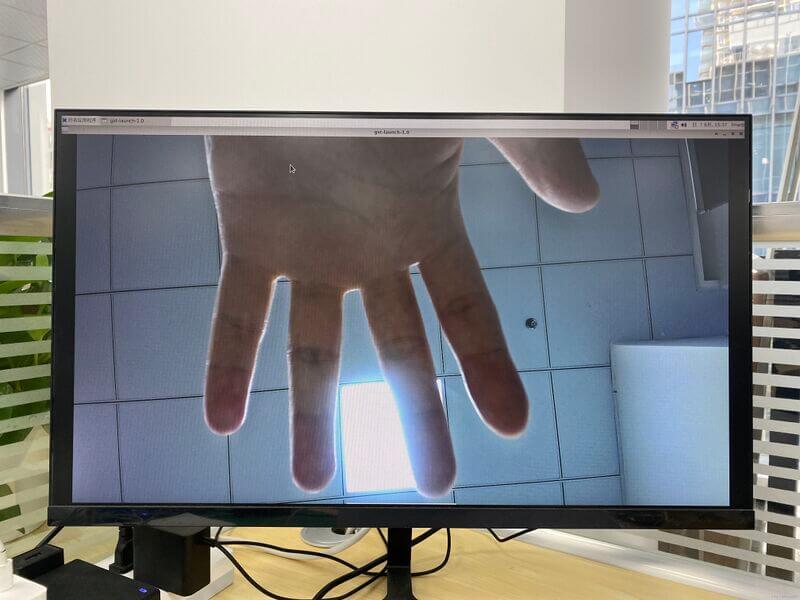
- Preview (requires a monitor for real-time preview)
// video31 or video11
root@armsom:/# gst-launch-1.0 v4l2src device=/dev/video31 ! video/x-raw,format=NV12,width=2112,height=1568, framerate=30/1 ! xvimagesink
Using Raspberry Pi Camera Module 2
This camera uses the Raspberry Pi Camera Module 2 module. After connecting and powering on the camera module, check the boot log.
root@armsom:/# dmesg | grep imx219
[    4.049680] imx219 4-0010: driver version: 00.01.02
[    4.074430] imx219 4-0010: Model ID 0x0219, Lot ID 0x258b89, Chip ID 0x056c
[    4.074460] imx219 4-0010: Consider updating driver imx219 to match on endpoints
[    4.074477] rockchip-csi2-dphy csi2-dphy4: dphy4 matches m01_b_imx219 4-0010:bus type 5
After confirming the driver is loaded, run the following command to take a photo or record a video
- take a photo
video22 or video11
root@armsom:~# GST_V4L2SRC_MAX_RESOLUTION=3280x2464 gst-launch-1.0 v4l2src device=/dev/video11 io-mode=4 ! videoconvert ! video/x-raw,format=NV12,width=3280,height=2464 ! jpegenc ! multifilesink location=photo.jpg
- record a video
video22 or video11
root@armsom:~# GST_V4L2SRC_MAX_RESOLUTION=3280x2464 gst-launch-1.0 v4l2src num-buffers=512 device=/dev/video11 io-mode=4 ! videoconvert ! video/x-raw, format=NV12, width=1920, height=1080, framerate=30/1 ! tee name=t ! queue ! mpph264enc ! queue ! h264parse ! mpegtsmux ! filesink location=/tmp/video.mp4
- Preview (requires a monitor for real-time preview)
video22 or video11
root@armsom:~# GST_V4L2SRC_MAX_RESOLUTION=3280x2464 gst-launch-1.0 v4l2src device=/dev/video11 ! video/x-raw,format=NV12,width=3280,height=2464, framerate=30/1 ! xvimagesink
Due to differences in mirror versions, some versions require manually installing gstreamer1.0. In these cases, if you get an error when using the command above to capture images, you can remove the GST_V4L2SRC_MAX_RESOLUTION=3280x2464 prefix and capture the images directly.
3.12 MIPI DSI
The CM7s MIPI-DSI interface supports resolutions up to 2K@60Hz.
- Connect the ribbon cable as shown below.
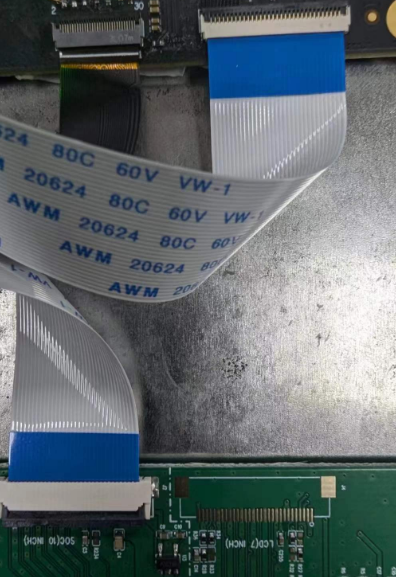
- The Linux image does not enable the MIPI LCD configuration by default. To use a MIPI LCD, enable it manually.
root@armsom:~# nano /boot/uEnv/uEnvarmsom-cm7s-io.txt
#dtoverlay=/dtb/overlay/rk3588s-armsom-cm7s-io-display-1200x1900-10.1hd-overlay.dtbo
Uncomment this line, save and exit, then reboot. The LCD should light up.
Product Certificate
CE / FCC / RoHS
Supply Statement
ArmSoM-CM7s will be produced at least until August 2034.
Accessory
The official accessories we designed for the ArmSoM-CM7s-IO are meant to help you get the best performance from your computer.
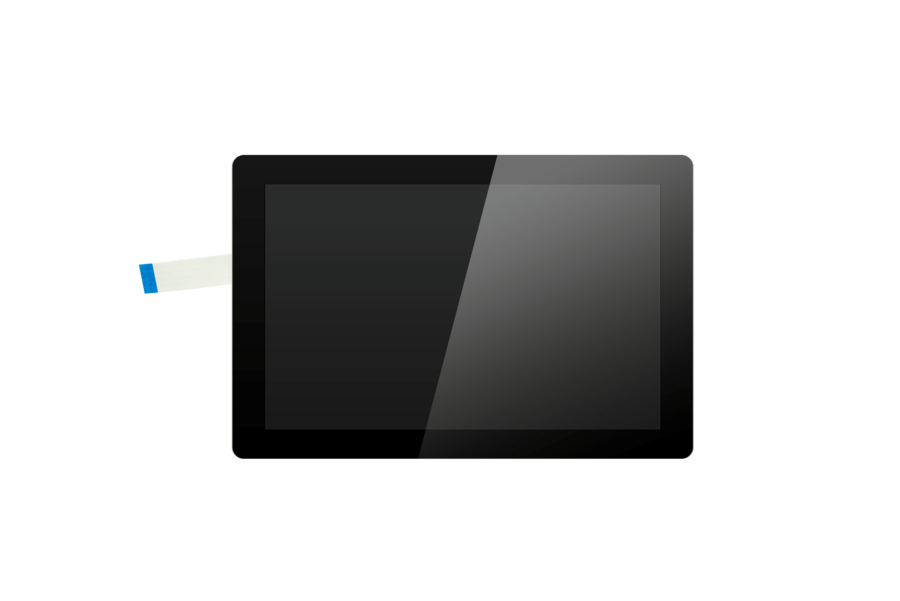
Display-10-hd
10.1-inch touchscreen display, can be used for interactive projects like entertainment systems and information dashboards.
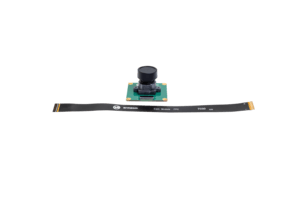
Camera-module1
The camera-module1 is compatible with the OV13850 and is a low-power camera module.
Purchase Samples
ArmSoM Official Website: https://www.armsom.org/product-page/cm7s
ArmSoM Official AliExpress Store: https://aliexpress.ru/item/1005013244630755.html?gatewayAdapt=glo2rus&sku_id=12000060657514869
ArmSoM Official Taobao Store: https://item.taobao.com/item.htm?id=1074292029401
For OEM & ODM, please contact: sales@armsom.org
Expert Perspective
User Case
Notes
- Before handling the device, please ensure you wear an anti-static wrist strap or take electrostatic discharge measures to prevent damage to the development board.
- Assembly should be performed in an electrostatic-safe environment, avoiding operations in dry and low-humidity conditions.
- When not in use, store the device in an anti-static bag and keep it in a suitably temperature-controlled, low-humidity environment to prevent static electricity buildup.
- When handling the device, avoid friction or collisions to prevent the generation of static electricity that could cause damage.
- When holding the device, try to avoid direct contact with the chips on the mainboard to prevent static damage.
- Do not plug or unplug wires or other devices while the device is operating to avoid damage from electrical surges.
- When connecting or disconnecting the GPIO/MIPI expansion interfaces, make sure to turn off the power and disconnect the power cable to prevent damage from electrical current.
Without effective cooling measures, the surface temperature of the main chip may exceed 60 degrees. When handling the device, please avoid direct contact with the SoC and surrounding power inductors to prevent burns. Ensure that the environment is well-ventilated during operation to prevent localized heat buildup, which could lead to overheating. Additionally, do not place the device in direct sunlight. It is recommended to choose between the official cooling fan, heat sink, or third-party cooling kits based on specific usage conditions to ensure optimal cooling performance.