8. FAN Interface
8.1 Interface Model and Connection
Fan connectors and control circuits vary by board. The models below use 5V fans with PWM-switched low-side speed control. The switched return is not a standalone logic PWM output.
| Product / hardware revision | Connector | Pin definition |
|---|---|---|
| Sige5 V1.3, Sige7 V1.1 | CN32, 0.8mm 1×3P | 1: 5V; 2: GND; 3: PWM-switched low-side return |
| Sige6 V1.0 | J19, 0.8mm 1×2P | 1: 5V; 2: PWM-switched low-side return |
| Other models | Refer to the product schematic/pin table | Do not infer wiring from pin count or wire color |
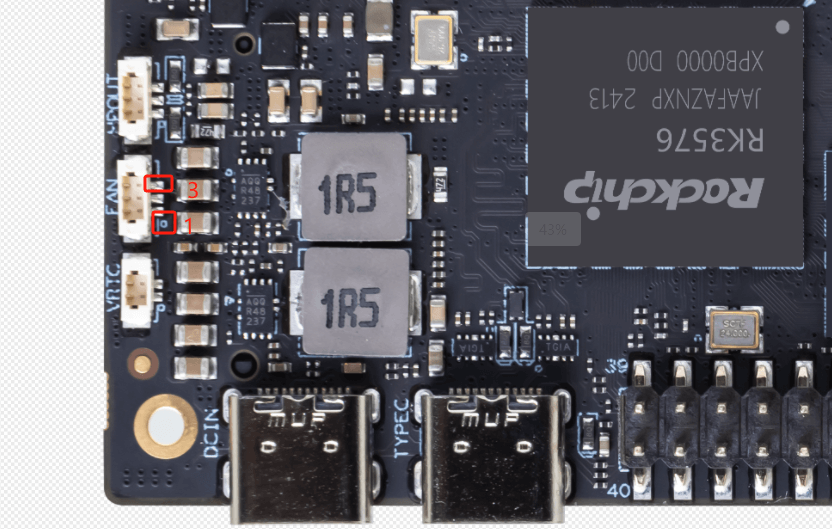
Connection notes:
- The 5V pin supplies the fan; GND is a fixed ground.
- A board transistor switches the low-side return. A two-wire fan uses the switched return for PWM speed control; connecting its negative lead to fixed ground bypasses this circuit.
- A three-/four-wire fan's PWM input, tachometer output and power return are different signals. Check the fan part number, wire assignment and board pin definition; refer to the connector specification for dimensions.
8.2 Using the Fan
The following example has six states (0–5). Temperature thresholds and PWM values depend on the image and device tree:
| Temperature | State | PWM Speed |
|---|---|---|
| Below 50°C | 0 | 0 |
| 50°C - 55°C | 1 | 50 |
| 55°C - 60°C | 2 | 100 |
| 60°C - 65°C | 3 | 150 |
| 65°C - 70°C | 4 | 200 |
| Above 70°C | 5 | 250 |
8.2.1 Verify PWM Fan Device is Recognized
After rebooting, you can check if the fan device has been recognized and configured correctly by running the following command:
root@armsom-sige5:/home/armsom# ls /sys/class/thermal/
If the pwm-fan configuration is successful in the device tree, you should see a directory like thermal_zoneX, which contains information related to fan control.
8.2.2 Adjusting Temperature and Fan Speed
The fan speed is controlled by the temperature. When the system temperature reaches a certain threshold, the system will automatically adjust the fan speed. You can manually simulate temperature changes to test if the fan is functioning correctly.
You can control the temperature policy through the thermal subsystem. For example, to check the current temperature status, you can use the following command:
root@armsom-sige5:/home/armsom# cat /sys/class/thermal/thermal_zone0/temp
If the temperature exceeds a certain threshold, the system will automatically adjust the fan speed. For example, you can use stress testing to rapidly increase the chip's temperature and verify the fan's operation:
root@armsom-sige5:/home/armsom# stress --cpu 4