3. RKNN SDK Quick Start Guide
Development Boards: ArmSoM-W3, ArmSoM-Sige7, ArmSoM-Sige5, ArmSoM-AIM7
OS: Debian11/12
Purpose: This article introduces how to use RK's NPU SDK.
As a high-performance 8nm AIOT platform by Rockchip, the RK3576/RK3588 NPU boasts powerful capabilities, with a design capable of achieving efficient neural network inference calculations of up to 6TOPS. This makes RK3576/RK3588 excel in various artificial intelligence fields such as image recognition, speech recognition, and natural language processing.
Moreover, the NPU of RK3576/RK3588 supports various learning frameworks, including TensorFlow, PyTorch, Caffe, MXNet, and others popular in artificial intelligence development. This provides developers with rich tools and libraries, enabling them to easily conduct model training and inference, effectively addressing various big data computation scenarios.
3.1 Typical Applications of RK3576/RK3588 NPU
Computer Vision: The NPU can be used for tasks such as image recognition, object detection, and face recognition. It finds extensive applications in fields like security monitoring, autonomous driving, and medical image analysis.
Natural Language Processing (NLP): The NPU accelerates tasks like text classification, sentiment analysis, and machine translation, making processing large-scale text data more efficient.
Speech Recognition and Processing: In speech recognition, speech synthesis, and related tasks, the NPU enhances processing speed and accuracy, applied in intelligent voice assistants, speech interaction systems, and more.
Smart Home and IoT: The NPU's low power consumption makes it suitable for IoT applications like smart home devices, intelligent surveillance cameras, and wearable devices, enabling device intelligence and automation.
Healthcare: In medical image analysis, disease diagnosis, genomics, and other fields, the NPU speeds up the processing and analysis of large-scale data, assisting healthcare professionals in more accurate disease diagnosis and treatment plan formulation.
Intelligent Transportation: In intelligent transportation systems, the NPU can be used for tasks like vehicle recognition, traffic flow monitoring, and intelligent traffic signal control, improving the efficiency and safety of transportation systems.
3.2 Rockchip NPU SDK
Rockchip's NPU SDK consists of two parts: the PC-side tool, rknn-toolkit2, used for model conversion, inference, and performance evaluation on the PC side. Specifically, it converts mainstream models such as Caffe, TensorFlow, TensorFlow Lite, ONNX, DarkNet, PyTorch, etc., into RKNN models. These RKNN models can be used for inference simulation on the PC side, calculating time and memory overhead. On the board side, there is the rknn runtime environment, which includes a set of C API libraries, driver modules for communication with the NPU, executable programs, etc.
The RKNN software stack helps users quickly deploy AI models to Rockchip chips. The overall framework is as follows:
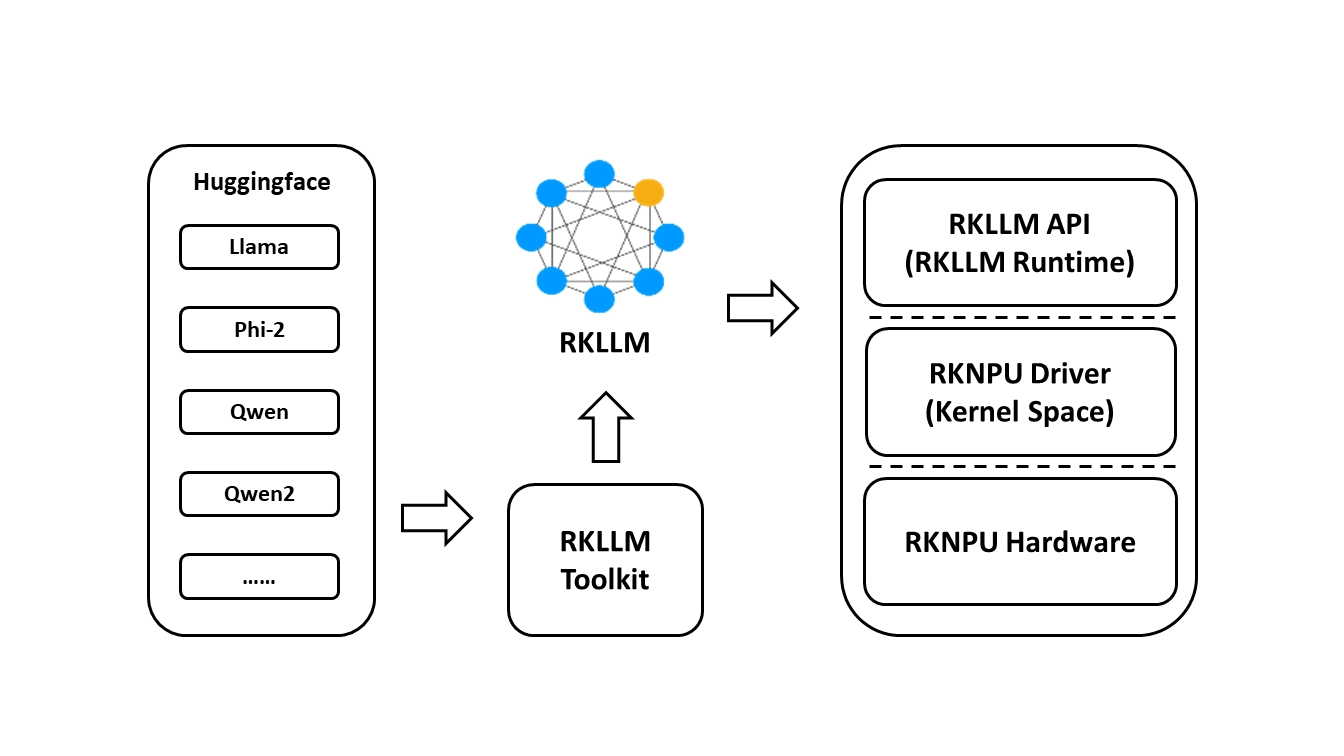
To use RKNPU, users need to first run the RKNN-Toolkit2 tool on their computer to convert trained models into RKNN format models, then use RKNN C API or Python API for inference on the development board.
RKNN-Toolkit2 is a software development kit for model conversion, inference, and performance evaluation on PC and Rockchip NPU platforms.
RKNN-Toolkit-Lite2 provides a Python programming interface for Rockchip NPU platforms, helping users deploy RKNN models and accelerate AI application landing.
RKNN Runtime provides C/C++ programming interfaces for the Rockchip NPU platform, helping users deploy RKNN models and accelerate the landing of AI applications.
The RKNPU kernel driver is responsible for interacting with the NPU hardware. It is open source and can be found in the Rockchip kernel code.
RKNPU2 SDK v2.0.0-beta (for RK3576/RK3562/RK3566/RK3568/RK3588/RV1103/RV1106) https://github.com/airockchip/rknn-toolkit2
Model zoo: https://github.com/airockchip/rknn_model_zoo
docs: https://github.com/airockchip/rknn-toolkit2/tree/master/doc
3.3 Prepare the Development Environment
This section describes a direct local installation, which is also used by the examples below. If you prefer Docker, prepare the environment according to the RKNN-Toolkit2 documentation.
The setup consists of four parts:
- Download the RKNN repositories.
- Install RKNN-Toolkit2 on the host computer.
- Install build tools.
- Install the RKNPU2 environment on the development board.
3.3.1 Download RKNN Repositories
Create a directory for the RKNN repositories, then clone RKNN-Toolkit2 and RKNN Model Zoo:
mkdir Projects && cd Projects
git clone https://github.com/airockchip/rknn-toolkit2.git --depth 1
git clone https://github.com/airockchip/rknn_model_zoo.git --depth 1
--depth 1 clones only the latest commit. If cloning fails, download the repository archives from GitHub and extract them into this directory.
3.3.2 Install RKNN-Toolkit2
Install Python and Conda
Python 3.8 is recommended. If it is unavailable, or if multiple Python versions are installed, create a dedicated Python 3.8 environment with Miniconda or Miniforge.
Check whether Conda is available:
conda -V
If it is not installed, download and install Miniconda for your host platform, then create and activate the environment:
conda create -n toolkit2 python=3.8
conda activate toolkit2
Install Dependencies and RKNN-Toolkit2
With the toolkit2 environment active, install the requirements file and wheel that match your Python version and CPU architecture. For Python 3.8 on x86_64:
cd Projects/rknn-toolkit2/rknn-toolkit2
pip install -r packages/x86_64/requirements_cp38-2.3.2.txt
pip install packages/x86_64/rknn_toolkit2-2.3.2-cp38-cp38-manylinux_2_17_x86_64.manylinux2014_x86_64.whl
Verify the installation:
python3
>>> from rknn.api import RKNN
If no error is reported, RKNN-Toolkit2 is ready.
3.3.3 Install Build Tools
Install CMake on the host computer:
sudo apt update
sudo apt install cmake
For Android boards, download Android NDK r19c (or a compatible version), extract it under Projects, and use that directory as ANDROID_NDK_PATH when building C demos.
For Linux boards, install an appropriate GCC cross-compiler. For example, an AArch64 board can use the Linaro aarch64-linux-gnu toolchain; its compiler path is typically similar to:
Projects/gcc-linaro-6.3.1-2017.05-x86_64_aarch64-linux-gnu/bin/aarch64-linux-gnu
3.4 Install the RKNPU2 Board Environment
3.4.1 Check the RKNPU2 Driver Version
Run the following command on the board to check the driver version:
dmesg | grep -i rknpu
Official Rockchip board images include the RKNPU2 driver. If the command returns no driver information, a third-party image may not include it. When building a kernel from source, enable CONFIG_ROCKCHIP_RKNPU=y and rebuild the kernel. RKNPU2 driver version 0.9.2 or later is recommended.
3.4.2 Check Whether RKNPU2 Is Installed
Board debugging with RKNN-Toolkit2 requires the RKNPU2 environment and the rknn_server service:
- RKNN Server is an agent running on the board. It processes data sent from the host computer through the board runtime and returns the result.
- RKNPU2 Runtime (
librknnrt.so) loads RKNN models and runs inference on the NPU.
Keep rknn_server, librknnrt.so, and RKNN-Toolkit2 at matching versions. Dynamic-shape RKNN models require rknn_server and the runtime library version 1.5.0 or later.
For Android, start the service and check its version:
adb shell
su
setenforce 0
/vendor/bin/rknn_server &
strings /vendor/bin/rknn_server | grep -i "rknn_server version"
strings /vendor/lib64/librknnrt.so | grep -i "librknnrt version"
For 32-bit Android, use /vendor/lib/librknnrt.so. For Linux, start and inspect the service with:
restart_rknn.sh
strings /usr/bin/rknn_server | grep -i "rknn_server version"
strings /usr/lib/librknnrt.so | grep -i "librknnrt version"
3.4.3 Install or Update RKNPU2
If the board does not have matching server and runtime versions, copy them from Projects/rknn-toolkit2/rknpu2.
For 64-bit Android:
adb root
adb remount
adb push runtime/Android/rknn_server/arm64/rknn_server /vendor/bin/
adb push runtime/Android/librknn_api/arm64-v8a/librknnrt.so /vendor/lib64/
adb shell
chmod +x /vendor/bin/rknn_server
su
setenforce 0
/vendor/bin/rknn_server &
For Linux, choose aarch64 for 64-bit boards or armhf for 32-bit boards:
adb push runtime/Linux/rknn_server/${BOARD_ARCH}/usr/bin/* /usr/bin
adb push runtime/Linux/librknn_api/${BOARD_ARCH}/librknnrt.so /usr/lib
adb shell
chmod +x /usr/bin/rknn_server /usr/bin/start_rknn.sh /usr/bin/restart_rknn.sh
restart_rknn.sh
3.5 Run an Example Program
This section covers the RKNN Model Zoo and the RKNN Python demo. Refer to each example's README.md for model-specific requirements.
3.5.1 RKNN Model Zoo
RKNN Model Zoo provides working examples for common models such as MobileNet and YOLO. Each model normally includes Python and C/C++ examples:
rknn_model_zoo
├── 3rdparty       # third-party libraries
├── datasets       # datasets
├── examples       # sample programs
├── utils          # shared helpers
├── build-android.sh
└── build-linux.sh
For example, examples/yolov8 contains cpp, model, python, and README.md directories.
3.5.2 Run the RKNN Python Demo
The following commands use YOLOv8 as an example.
3.5.2.1 Prepare the Model
Download the ONNX model:
cd Projects/rknn_model_zoo/examples/yolov8/model
./download_model.sh
3.5.2.2 Convert the Model
Convert the original ONNX model to RKNN format. Select the appropriate platform and quantization option for your board:
cd Projects/rknn_model_zoo/examples/yolov8/python
python convert.py ../model/yolov8n.onnx rk3576 i8 ../model/yolov8n_relu.rknn
3.5.2.3 Run the Demo
Run the RKNN model on the connected board. --img_show displays the result image:
cd Projects/rknn_model_zoo/examples/yolov8/python
python yolov8.py --model_path ../model/yolov8s_relu.rknn --target rk3588 --img_show
To run the original ONNX model on the host instead:
python yolov8.py --model_path ../model/yolov8s_relu.onnx --img_show
3.6 RK3576/RK3588 NPU Use Cases
Steps for exporting rknn models
Please refer to https://github.com/airockchip/rknn_model_zoo/tree/main/models/CV/object_detection/yolo
3.6.1 Precautions
- Use rknn-toolkit2 version greater than or equal to 1.4.0.
- When switching to your own trained model, pay attention to aligning post-processing parameters such as anchors, otherwise it may cause post-processing parsing errors.
- Official website and Rockchip pre-trained models detect 80 classes of objects. If using your own trained model, you need to change the OBJ_CLASS_NUM and NMS_THRESH post-processing parameters in include/postprocess.h.
- The demo requires support for librga.so. For compilation and usage, please refer to https://github.com/airockchip/librga.
- Due to hardware limitations, post-processing for the YOLOv8 model in this demo runs on the CPU by default. The supplied models use ReLU activation; compared with SiLU, this slightly reduces accuracy while substantially improving performance.
3.6.2 Android Demo
3.6.2.1 Compilation
First, import ANDROID_NDK_PATH, for example, export ANDROID_NDK_PATH=~/opts/ndk/android-ndk-r18b, then execute the following command:
./build-android.sh -t <target> -a <arch> [-b <build_type>]

Example:
./build-android.sh -t rk3568 -a arm64-v8a -b Release
3.6.2.2 Push the Executable to the Board
Connect the USB port of the board to the PC, and copy the entire demo directory to /data:
adb root
adb remount
adb push install/rknn_yolov8_demo /data/
3.6.2.3 Running
adb shell
cd /data/rknn_yolov8_demo/

export LD_LIBRARY_PATH=./lib
./rknn_yolov8_demo model/<TARGET_PLATFORM>/yolov8s-640-640.rknn model/bus.jpg
3.6.3 AArch64 Linux Demo
3.6.3.1 Compilation
First, import GCC_COMPILER, for example, export GCC_COMPILER=~/opt/gcc-linaro-7.5.0-2019.12-x86_64_aarch64-linux-gnu/bin/aarch64-linux-gnu, then execute the following command:
./build-linux.sh -t <target> -a <arch> -b <build_type>]
# Example:
./build-linux.sh -t rk3588 -a aarch64 -b Release
3.6.3.2 Push the Executable to the Board
Copy install/rknn_yolov8_demo_Linux to the /userdata/ directory on the board.
If using Rockchip's EVB board, you can push the file to the board using adb:
adb push install/rknn_yolov8_demo_Linux /userdata/
- If using other boards, use
scpor a similar method to copyinstall/rknn_yolov8_demo_Linuxto/userdata/.
3.6.3.3 Running
adb shell
cd /userdata/rknn_yolov8_demo_Linux/

export LD_LIBRARY_PATH=./lib
./rknn_yolov8_demo model/<TARGET_PLATFORM>/yolov8s-640-640.rknn model/bus.jpg
Note: Try searching the location of librga.so and add it to LD_LIBRARY_PATH if the librga.so is not found on the lib folder. Using the following commands to add to LD_LIBRARY_PATH.
export LD_LIBRARY_PATH=./lib:<LOCATION_LIBRGA.SO>
3.6.4 Video Stream Demo Commands
- h264 Video
./rknn_yolov8_video_demo model/<TARGET_PLATFORM>/yolov8s-640-640.rknn xxx.h264 264
Note: H264 video stream is required. You can use the following command to convert:
ffmpeg -i xxx.mp4 -vcodec h264 xxx.h264
- H265 Video
./rknn_yolov8_video_demo model/<TARGET_PLATFORM>/yolov8s-640-640.rknn xxx.hevc 265
Note: H265 video stream is required. You can use the following command to convert:
ffmpeg -i xxx.mp4 -vcodec hevc xxx.hevc
- RTSP Video Stream
./rknn_yolov8_video_demo model/<TARGET_PLATFORM>/yolov8s-640-640.rknn <RTSP_URL> 265
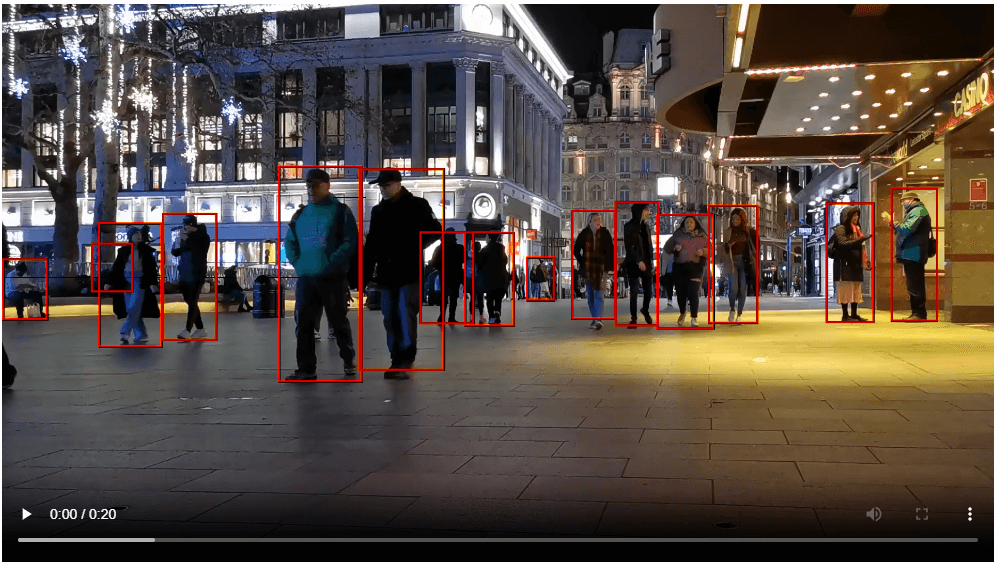
- Choose the correct librga library based on the system's rga driver. For specific dependencies, please refer to: https://github.com/airockchip/librga
- rk3562 currently only supports h264 video streams
- rtsp video stream demo is only supported on Linux system, not yet supported on Android
- The name of the h264 video stream input cannot be "out.h264" as it will be overwritten